How to spot issues in a Matter device
 Carlos Sahuquillo
·
1 octubre, 2026
·
12 min de lectura
Carlos Sahuquillo
·
1 octubre, 2026
·
12 min de lectura
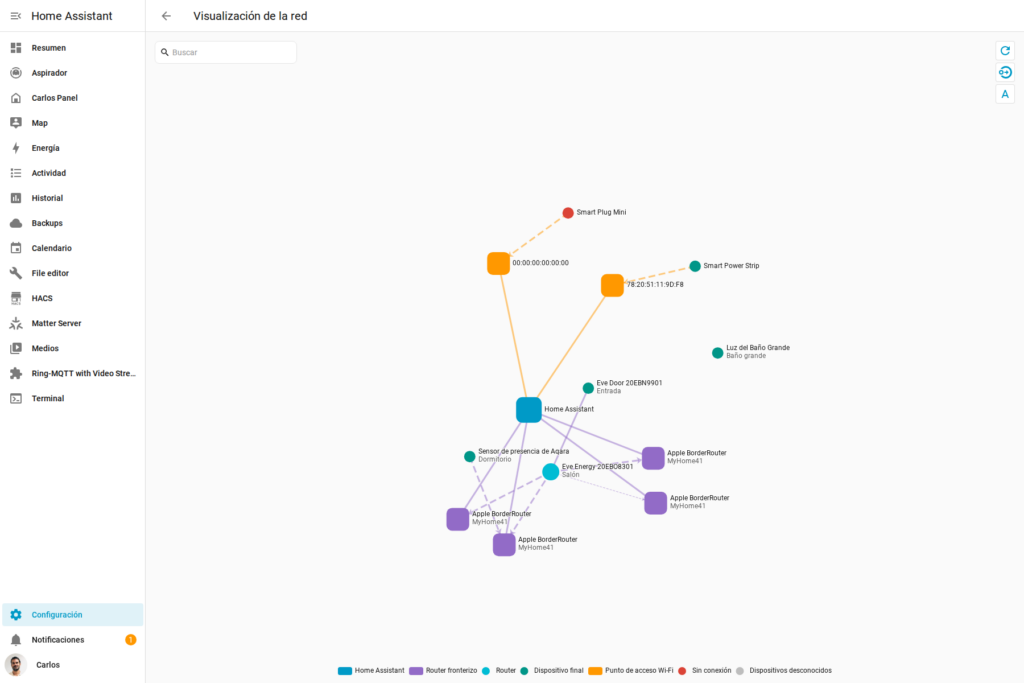
When a Matter-connected device stops responding, the information we get is pretty poor… Home Assistant, Apple Home, or whatever app you’re using tells you the device is «unavailable» and not much else. You don’t know if it’s the Matter server failing, the Thread network, the Wi-Fi coverage, the border router, the controller, if the device simply ran out of battery… or if someone just unplugged it. Let’s see how we can try to diagnose this a bit better.
Home Assistant, in version 2026.9, has added a Matter and Thread network map that aims to shed some light on this.
So, in my house I have a lot of Matter devices… I’ve got Aqara sensors like the Aqara P2 motion sensor we talked about the other day, several Eve devices, Meross plugs, Shelly and SONOFF switches, four or five Apple border routers, and the Tedee lock that’s now Matter compatible. On top of that, HomeKit and Home Assistant share devices via the Multi-Admin feature we’ve talked about a few times already, so on my map I have plenty of material to see if it actually works… if you only have a couple of Matter devices, you’re going to see a pretty sad-looking map.
Matter is the standard, Thread is the protocol
Before looking at the map, I should remind new podcast listeners or those of you who’ve just found the blog that Matter is the standard devices use to talk to each other, but the communication can travel over different networks. Some Matter devices work over Wi-Fi, and others use Thread, which is kind of like a Zigbee network but on steroids… basically it’s a mesh network, a low-power meshed network designed especially for sensors and battery-powered devices.
Just like Zigbee devices need a hub or coordinator, Thread devices need a border router to reach the rest of the IP network. In my setup, that job is done by the HomePods and the Apple TV. I already explained in more detail how both platforms coexist in the post Thread Devices in HomeKit and Home Assistant, I’ll drop the link in the show notes, but until now I didn’t have such a clear, graphical representation of the actual routes.
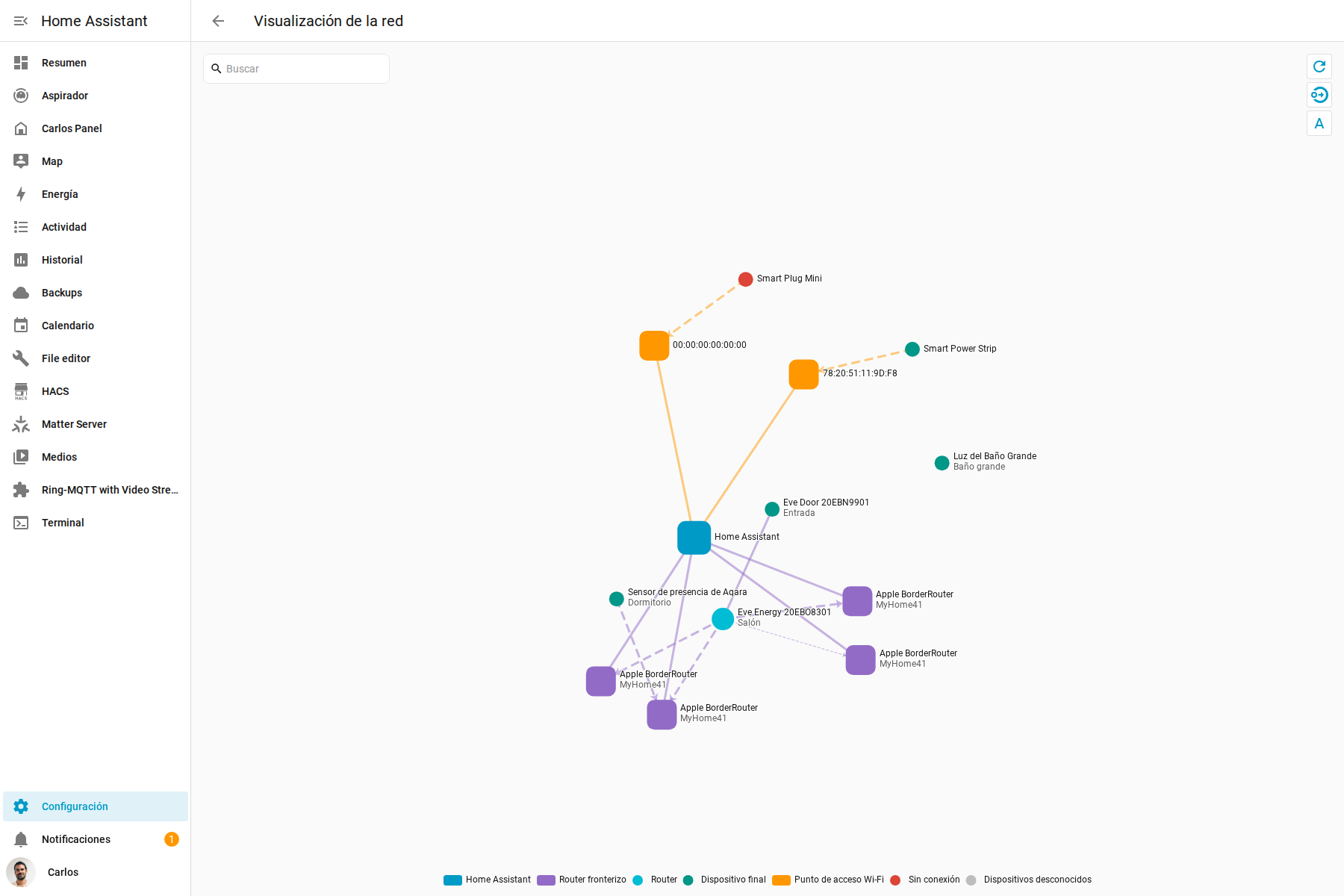
In Home Assistant, you can find the map under Settings → Devices & Services → Matter → Show map. I’ve put a few screenshots on the blog and ran some tests unplugging devices to see what happened, so if you’re listening to this on the podcast and want to see it more visually, swing by the blog because it’s hard to explain just by voice.
Four border routers with the exact same name
When I open the map in my Home Assistant, I see Thread devices like the Aqara P2, the Eve Door and Eve Energy, and other devices that work over Wi-Fi like a Meross power strip and a Meross plug too, plus SONOFF switches.
There are also four border routers showing up within Apple’s Thread network, called MyHome41. Seeing four nodes confirms to me that the network has redundancy and doesn’t depend on a single device the way Home Assistant does, but the problem is they’re all called exactly Apple BorderRouter.
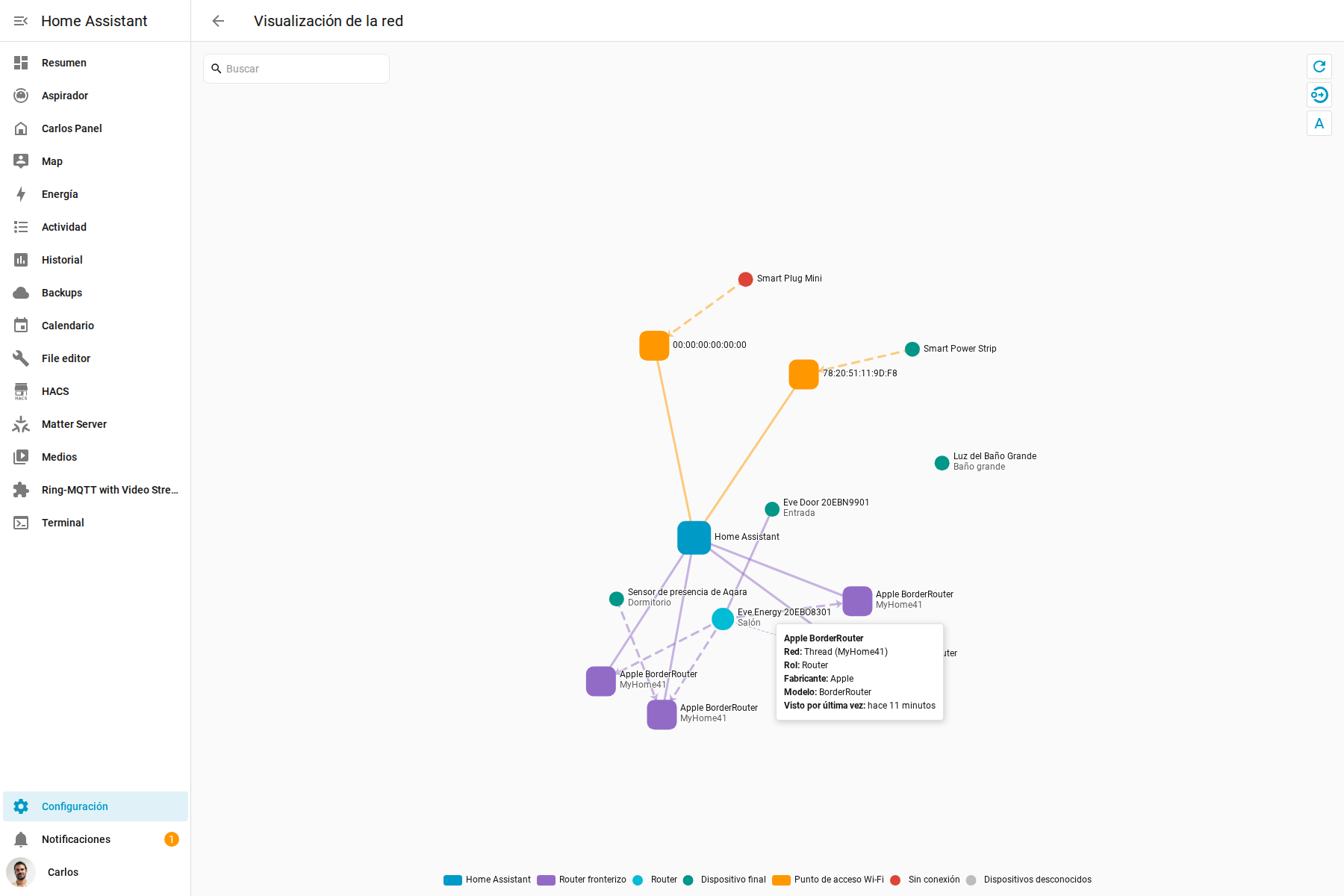
I have no way of knowing which one is the living room HomePod, which one belongs to another room, or which one is the Apple TV. If a line shows up weak and I want to move or restart the corresponding unit, I have to identify it by process of elimination. The map gives a lot more information than before, but on this point it falls short, and I’d love it to give me a bit more info, at least the hostname or something like that—the name you give the device yourself when you set it up.
The Aqara P2 is well connected
The Aqara P2 in the bedroom, which I told you a couple of weeks ago I’d used to find out when my kids come into my room, shows up as a Thread device connected to one of the Apple border routers with a signal of about -41 dBm. That’s a strong link, so there’s nothing to fix on this device.
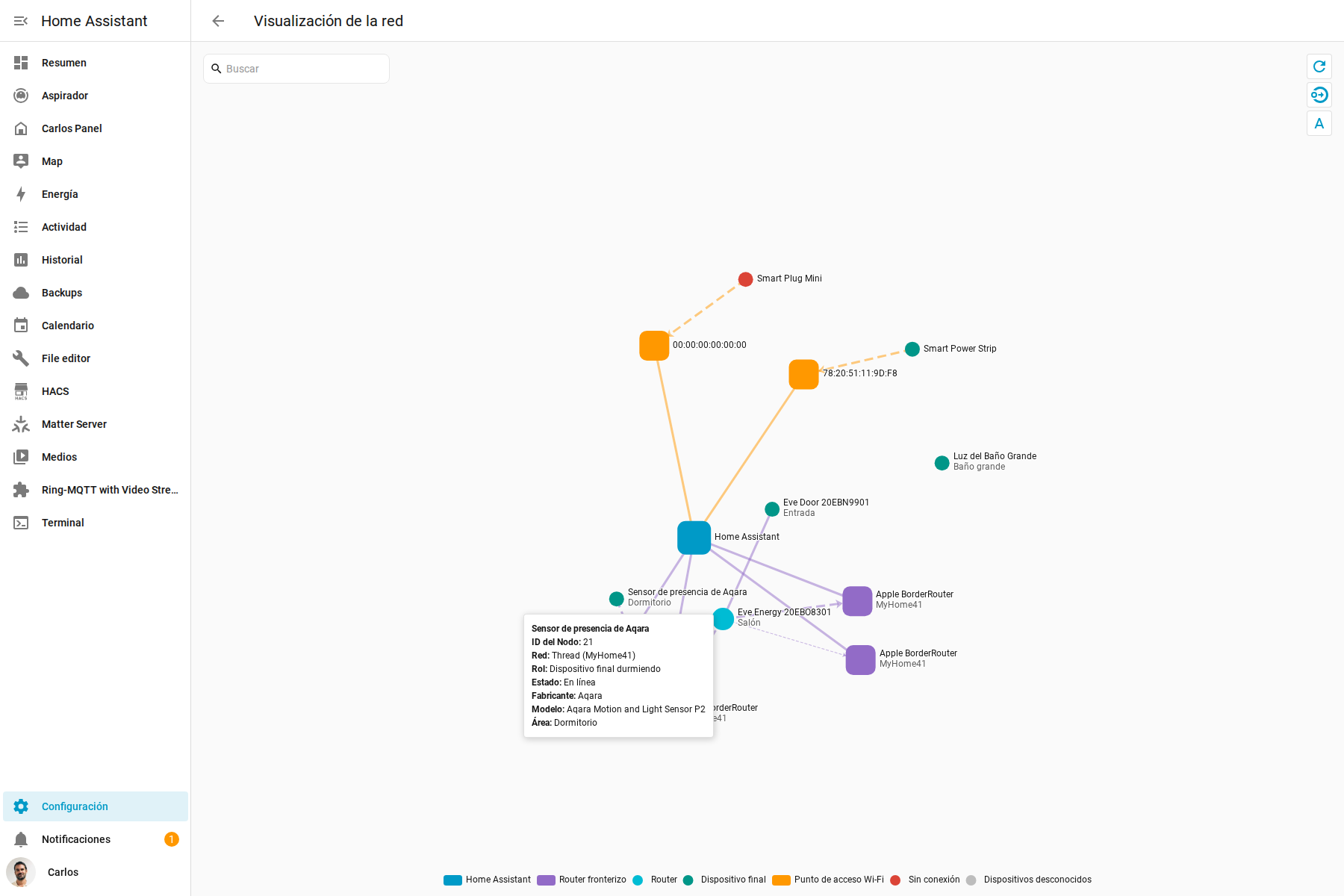
Home Assistant classifies it as a sleepy end device. Since it runs on batteries, the sensor stays asleep most of the time to save power, wakes up when it needs to report something, and end device means it doesn’t route traffic for other devices. So the map lets you check at a glance whether the device is available, what role it plays within Thread, and how it reaches the rest of the network, all in a very visual way.
The Eve Door shows exactly what a mesh network is for
The most interesting part of the map is the Eve devices. The Eve Door I have at the entrance, for example, also runs on batteries and shows up as another sleepy end device, but it isn’t connected directly to an Apple border router.
Its route goes through the living room’s Eve Energy. Since the Eve Energy is a plug and is permanently powered, it can act as a Thread router and carry the door sensor’s traffic all the way to the border routers. This is exactly what a mesh network is supposed to do: mains-powered devices extend coverage and provide routes for battery-powered sensors.
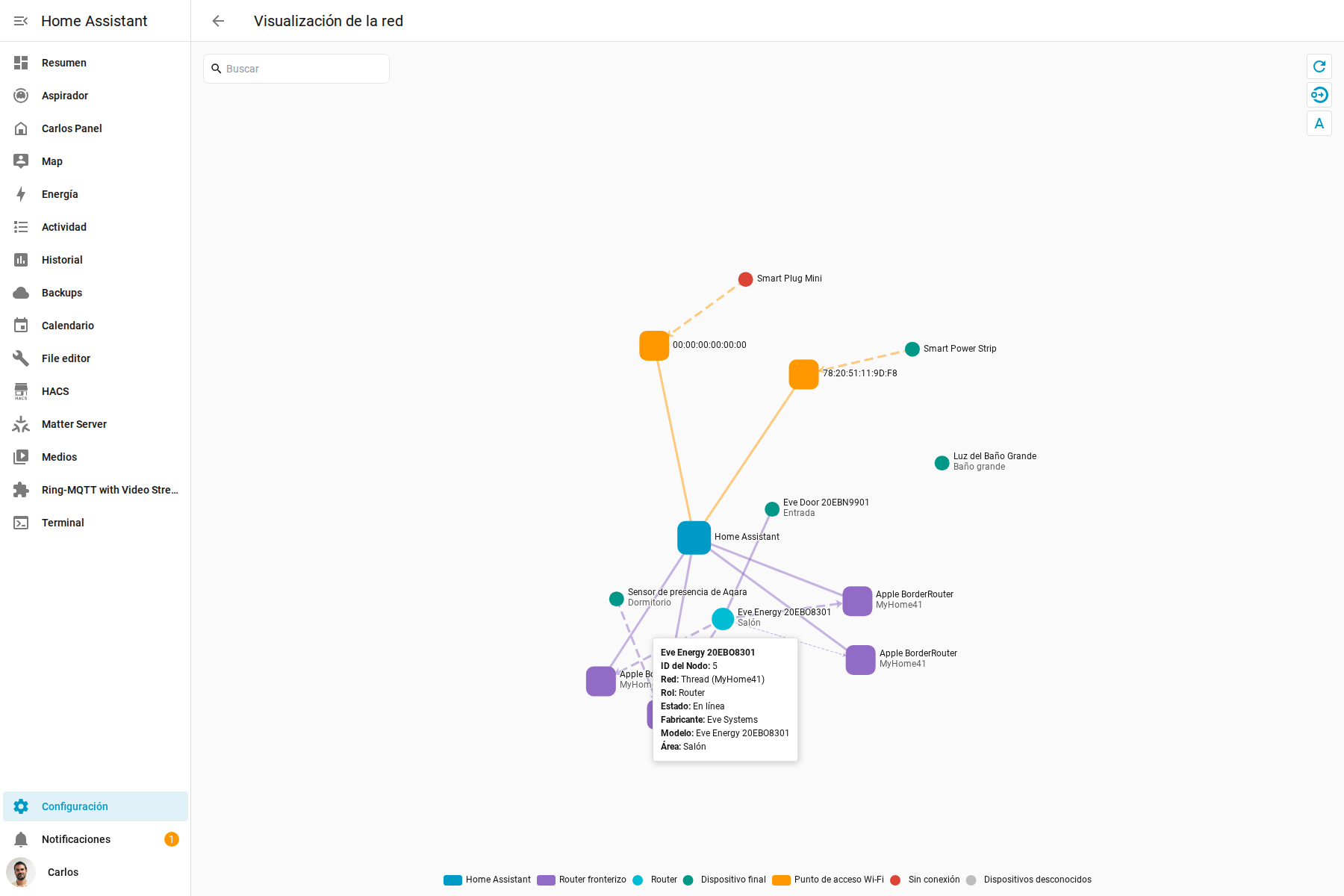
The link between the two Eve devices is good. On top of that, the Eve Energy has a connection to all four Apple border routers. One of those links is excellent, which must be the HomePod Mini sitting right next to the Eve Energy; the other two are good, and the fourth is around -88 dBm, which is already a weak signal—that must be the HomePod Mini in my daughter’s room, which is the furthest away.
That doesn’t mean I need to go unplug that HomePod Mini. The Eve Energy has three other better routes, and that’s exactly the beauty of a mesh: nothing depends on a single path. A weak line can be a backup link that’s barely being used… but it’s there, weak but there. The real problem would be finding an entire branch of devices depending on a single crappy connection.
On Wi-Fi it spots the problem, but not always the cause
The map also includes Matter devices that work over Wi-Fi. My Meross power strip shows up as available and connected to an access point with a reasonable signal, though Home Assistant identifies the access point by its MAC address instead of showing a readable name… super easy to identify, right. I’m guessing it’s the HomePod Mini right above it, but I haven’t gotten around to unplugging it to see if it disappears.
Another more obvious case is a Meross Smart Plug Mini. It shows up in red as unavailable, so it stands out instantly on the general map. I don’t have to open every single device one by one until I find the one that’s not responding.
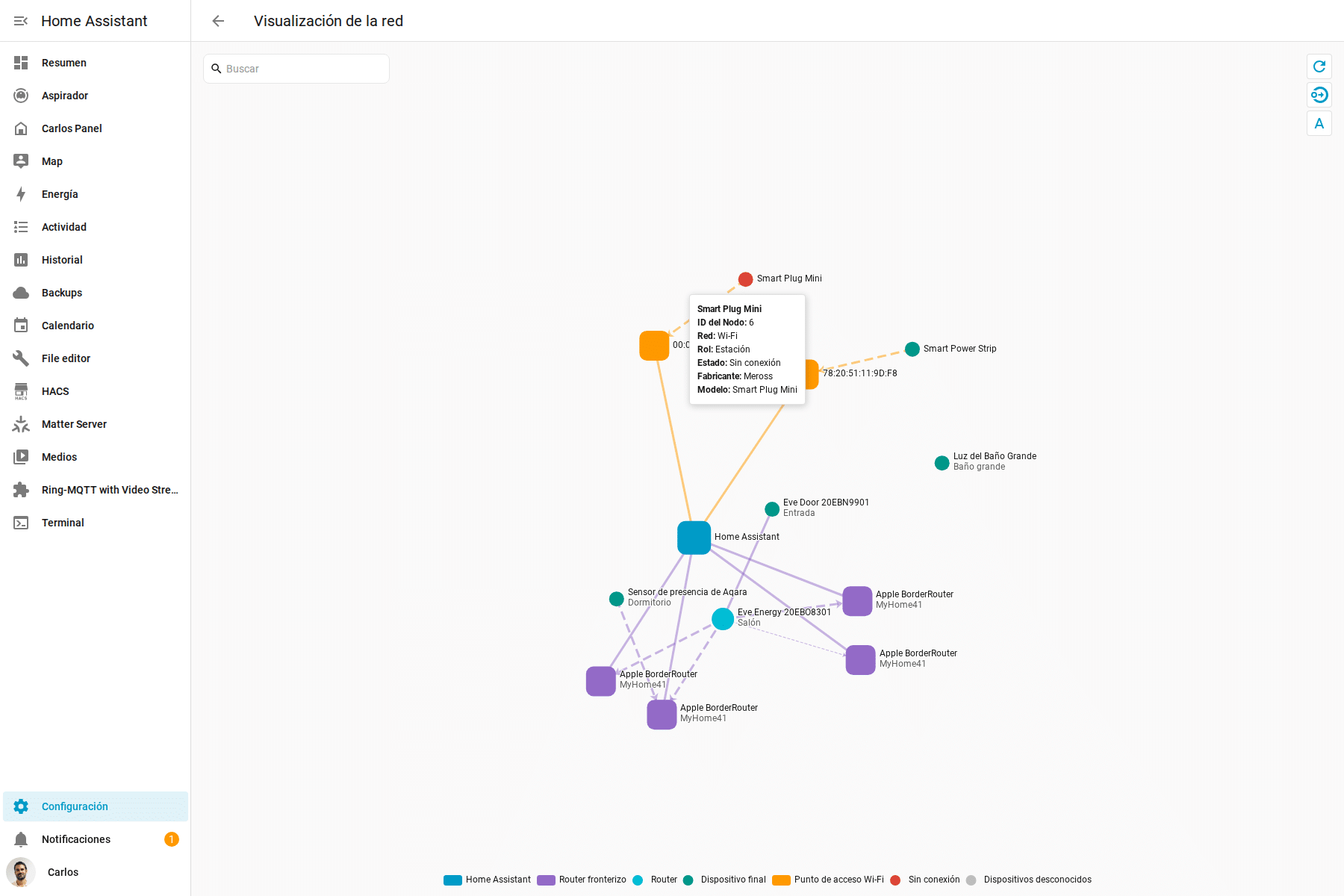
The problem is the investigation doesn’t go much further than that. The associated access point shows up with the MAC address 00:00:00:00:00:00. The last recorded signal strength didn’t look bad, but the map doesn’t clarify whether the plug has hung, lost Wi-Fi, had its Matter session expire, or if I’m just looking at stale data. I know the device isn’t responding, but I have no bloody idea why… my bet is it’s a temporary plug like the one for the Christmas tree lights, which obviously is stored away in the Christmas decorations box and has no power until early December… but who knows.
The SONOFF switch in the bathroom, a MINIRM, shows another limitation. It’s available, and Home Assistant knows it works over Wi-Fi, but it shows up floating with no line to any access point. The map is built with whatever information each device provides; if the manufacturer doesn’t hand over full diagnostics about what it’s connected to, Home Assistant can’t just make it up either, and it looks isolated from the world when it really isn’t—it must be connected to an access point on its own or through some other device… though in this case I’d say it’s connected on its own, since it has constant power and is surrounded by HomePods in every nearby room, so in principle it shouldn’t need another device to act as a bridge for it.
The Tedee lock is Matter, but it’s not showing up
By the way, I also expected to find the Tedee lock because my Tedee GO is Matter compatible and is added to Home via the Matter link, but it doesn’t show up anywhere on the map. Funny thing.
It’s not disconnected, nor has Home Assistant drawn it wrong. In Home Assistant I have the lock both through Tedee’s native integration with its bridge, and also connected via Matter. The Matter connection is working fine—in fact, in the Home app it shows up perfectly connected via Matter without depending on Home Assistant at all… but it seems Home Assistant recognizes it through a different path, sticking with the original connection from the Tedee bridge… who knows why.
So there you go, the map isn’t an X-ray of every Matter device that physically exists in the house. It shows the devices connected in some way to Home Assistant’s Matter server. With Multi-Admin, you can have several Thread networks in the same house, and each controller keeps its own view… even if you think you have everything duplicated like in my case.
But anyway, we’ve learned that a device can work perfectly through Matter in Home and not show up in Home Assistant… well, it does show up in Home Assistant, just not on the device map. That doesn’t mean it’s broken; it might be on a different fabric, or like the Tedee, it might be coming into Home Assistant through a different integration.
Thread says I don’t have a preferred network
The standalone Thread integration adds another small dose of chaos. Its screen claims Home Assistant still doesn’t have a preferred Thread network. And yet, the Matter map happily shows the Aqara, the Eves, and all four border routers on Apple’s MyHome41 network.
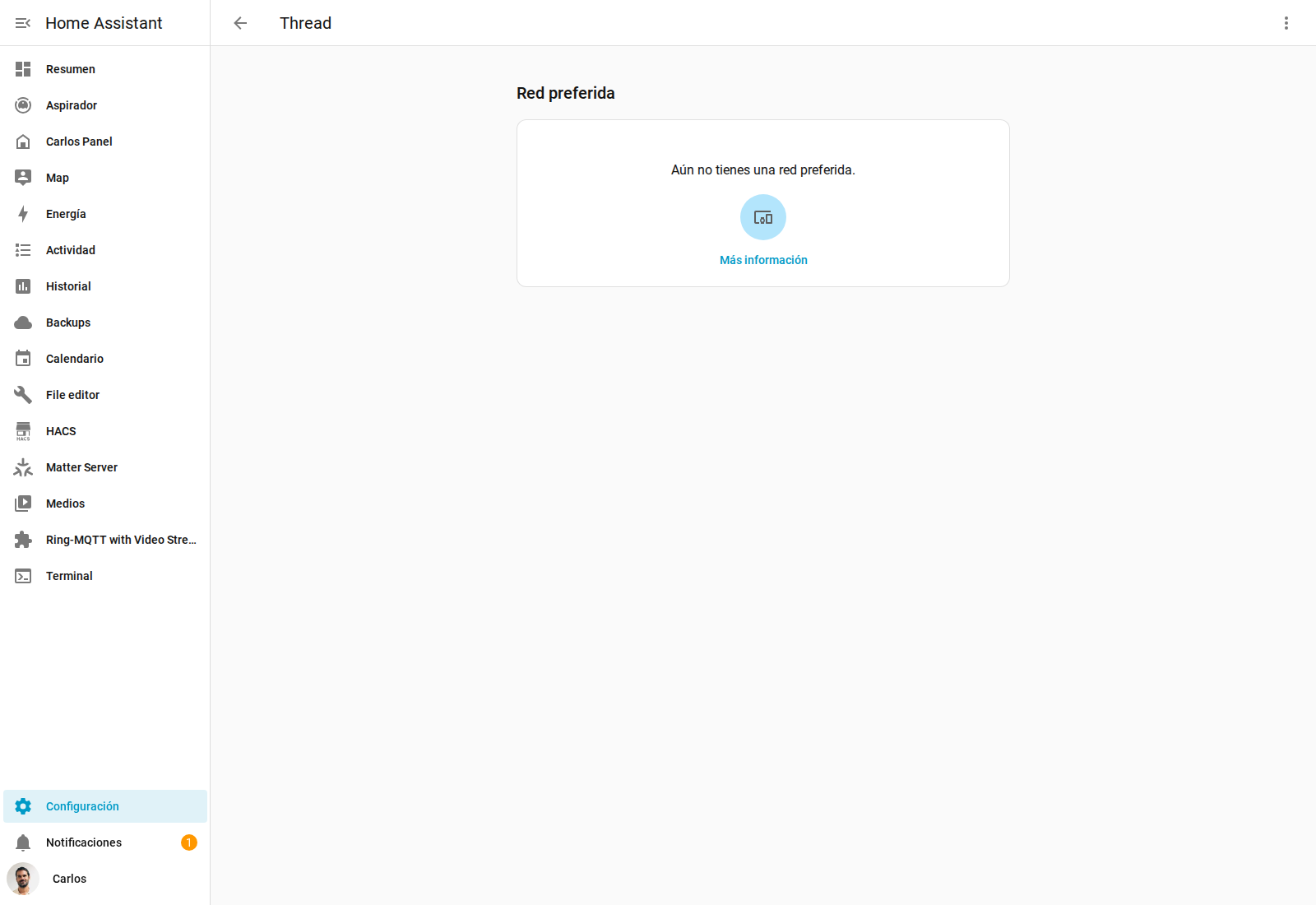
In my setup this makes sense, because Apple is the one maintaining the Thread network. I decided to keep using it because, as you know, I have several HomePods of different sizes and an Apple TV, so I get high availability and fault tolerance… Home Assistant can work with the Matter devices on that network even though its own Thread screen doesn’t have a preferred network configured. Technically it might be consistent, but opening both screens and reading what look like contradictory messages doesn’t help one bit.
Does it actually help diagnose Matter?
To sum up, if a Matter device stops responding on me tomorrow, this will be the first screen I open. In a few seconds I can check whether it uses Thread or Wi-Fi, whether it’s offline, whether it’s an end device or works as a router, which node it’s linked to, and whether it has alternative routes available.
That saves quite a few random restarts. If a Thread sensor depends on a single weak route, I can check the coverage or add a powered Thread router nearby. If several devices disappear behind the same border router, I already have a suspect. If a single Wi-Fi device shows up red while everything else keeps working fine, there’s no point starting out by restarting the whole of Home Assistant.
But it’s still not the absolute truth about the network. It doesn’t physically identify the Apple border routers, it doesn’t always recognize the Wi-Fi access points, some available devices show up with no route at all, and it doesn’t include Matter devices that Home Assistant controls through other integrations or that don’t depend directly on its Matter server.
The map doesn’t suddenly make managing a Matter network simple, because we still have too many layers and too many different ways of connecting the same thing. But still, at least when something breaks, we now have a lot more information than a grey icon and the hope that restarting twenty gadgets will fix it.
My recommendation is to open the map while everything’s working and save a screenshot. That way you’ll know what your house’s normal topology looks like before some device goes to hell and you have to figure out what changed.
Carlos Sahuquillo
'Haga lo que haga en la vida, siempre compito' - Jacques Villeneuve Reserva una sesión →
Entradas relacionadas
HomeKit with AI in iOS 27
Apple released iOS 27 on September 14th and, as every year, I'm going through what's changing in the Home app and HomeKit.…
Webhooks and workflows in Controller for HomeKit
Kicking off Season 4. I'm picking back up the automation for the sensor that kept running out of batteries that I told…

How to tell if your kid is sneaking into your room without having a camera
I bought the Aqara P2 presence and light sensor with Matter, and I've got it running simultaneously on HomeKit and Home Assistant…
0 comentarios