My HomePod plays music by itself: causes and fixes
 Carlos Sahuquillo
·
22 enero, 2026
·
9 min de lectura
Carlos Sahuquillo
·
22 enero, 2026
·
9 min de lectura
Ep. 105 · escúchalo
0:00 / 9:27

Idioma:CastellanoEnglish
Today I want to talk to you about a global glitch that’s been giving some HomePods around the world a hard time for a few months now, especially the HomePod Mini… and well, I say it’s something global because it’s happening to people in lots of different countries… but it doesn’t happen on all HomePods, in fact it only happens to me on one of the 5 I have… and in my case it can more or less coincide with the rollout of iOS 26, but you can’t directly link it either, since there are people on Reddit talking about it for months now, so… no idea, but what’s clear is that, whether it’s because of iOS 26 or because of planned-more-than-obsolescence, a bunch of HomePods have suddenly started failing.
What to do if your HomePod plays music on its own
- Check the Home app to see if there’s an automation, alarm, or scene triggering the playback.
- Restart the HomePod from Home and update it to the latest available version.
- If it happens again, factory reset it. On the HomePod mini you can also restore the firmware by connecting it via USB-C to a Mac or PC, following Apple’s official procedure.
- If the touch panel generates phantom taps, the smart plug I explain further below works as a temporary fix, but it doesn’t repair the hardware.
The problem: a ghost is pressing the top
If your HomePod has suddenly stopped working or is behaving strangely, let me tell you that you’re not alone. If you do a search on Reddit you’ll see there are a ton of users reporting weird glitches, especially with the HomePod Mini. A few weeks ago it happened to Emilcar. In his case, one of his HomePods stopped responding as an accessory hub and he had to restore it… but restore it with the full process, which involves connecting it to a Mac and installing the firmware at a low level, then updating it again and so on… and it got fixed, he hasn’t told us about any more issues since. In my case, one night the music started playing on the HomePod Mini in my daughter’s room. She stopped it and went back to sleep like nothing had happened, but a little while later it started playing again… with Andrés Calamaro, which isn’t that bad, but it was already somewhat alarming and I unplugged it. What bugged me is that version 26.2 of the operating system had just come out the day before, and I thought it had been the update that, upon downloading, had restarted it and unpaused the music… but no. It bugs me that it’s happened to pretty much everyone starting more or less from HomePod OS 26, which is no longer called that but rather AudioOS 26, hinting that there will be a new system that isn’t just Audio but anyway… the thing is that now that all our HomePods are just under 3 years old, suddenly a bunch of them have broken all over the world. Either it’s a bug in version 26… or it’s a clear case of planned obsolescence, not from Apple this time but from some internal component. Anyway, I talked to the Apple Store at La Vaguada, which is the closest one to my house, gave them the serial number, and they told me it was no longer under warranty and the only thing I could do was buy another one. Sure, the gadget isn’t expensive, you can even find one on Wallapop at a good price, but there are rumors that a new HomePod Mini 2 is coming out in a few months (watch out, this can make our conspiracy theories grow even more, with someone pushing us to buy the new one…)… but anyway, the thing is I don’t think it’s a good time to buy a new HomePod Mini, so I had to figure out whether it was going in the trash or could be fixed somehow. Needless to say, I tried Emilcar’s method, plugged it into the Mac, and restored it in DFU mode or whatever it’s called on the HomePod… and a few days later it started acting up again. On top of that, it was clear that the HomePod thought someone was pressing the top, because if you cut the power and turn it back on, the LED on top starts spinning while it restarts… and sometimes it turns red and says it’s going to restore, which is what it does when you deliberately want to restore it, and the method is precisely that, pressing the top when you give it power again to start the reset process…. Either way, I had to find a way to fix it… or throw it in the trash to sleep the sleep of the just, of course.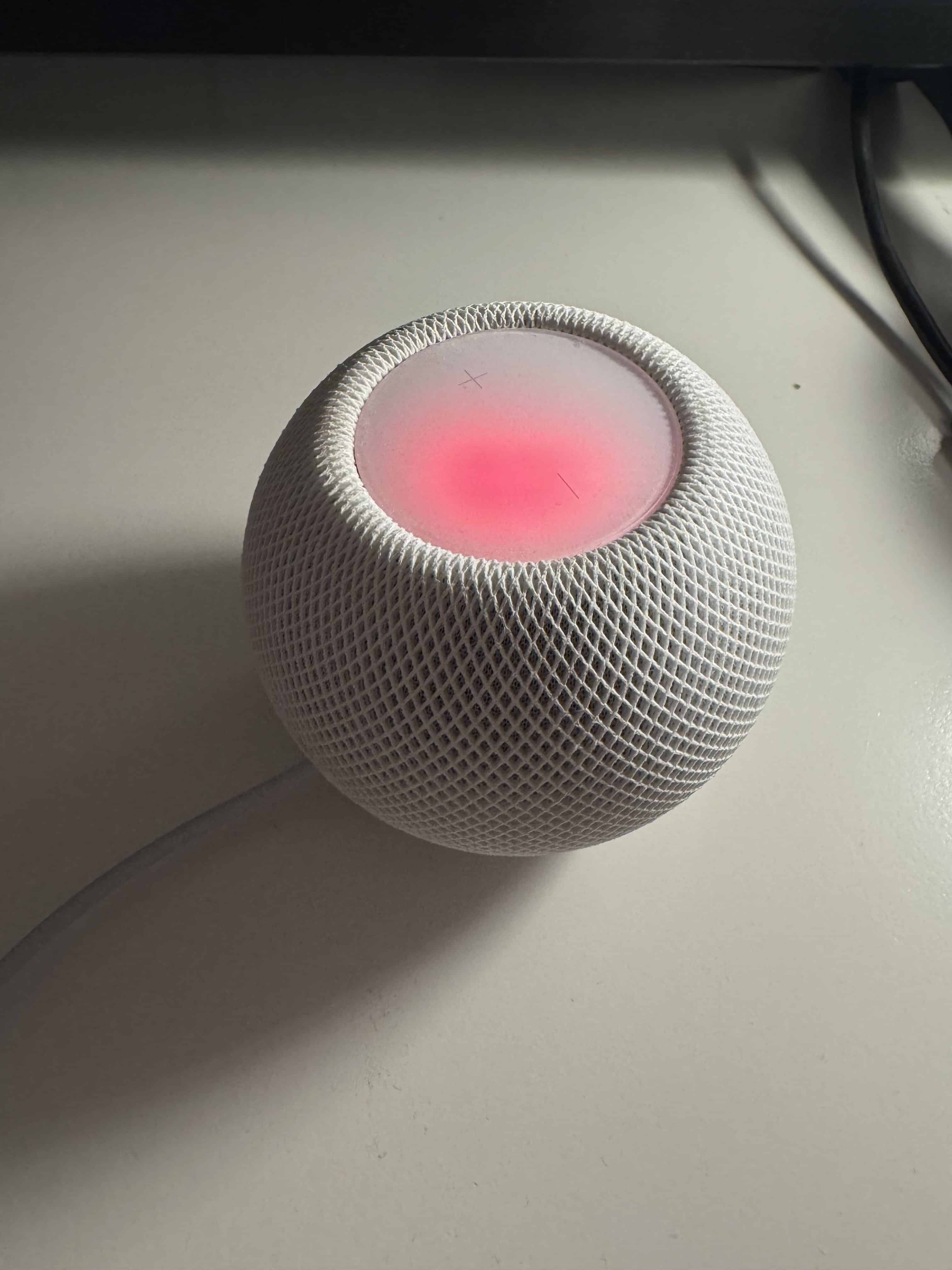
¿Necesitas ayuda con tu domótica?
Te ahorro tiempo, dinero y disgustos. Sesiones de consultoría desde 60€.
You might also be interested in
Carlos Sahuquillo
'Haga lo que haga en la vida, siempre compito' - Jacques Villeneuve Reserva una sesión →
Sigue leyendo
Ver todo el blog
Entradas relacionadas

22 octubre, 2026 · Domótica
Leer
15 preguntas de domótica que se repiten una y otra vez
He revisado comentarios del blog y correos de lectores para juntar las dudas que más se repiten sobre Shelly, HomeKit, Matter, Home…
Ep. 116 · escúchalo
0:00 / 22:46

15 octubre, 2026 · Domótica
Leer
Apple vuelve a por la casa: HomeView, HomePod mini 2 y Apple TV 4K
Apple presenta HomeView, HomePod mini 2 y un nuevo Apple TV 4K. Repasamos precios, disponibilidad en España y el futuro de Apple…
Ep. 115 · escúchalo
0:00 / 19:51

8 octubre, 2026 · Domótica
Leer
How to re-pair Zigbee sensors in Home Assistant without losing your automations
Swapping the battery wasn't enough to bring four Aqara sensors back to life. Here's how I re-paired them with ZHA without losing…
Ep. 114 · escúchalo
0:00 / 19:22
0 comentarios