Roborock Unavailable in Home Assistant
 Carlos Sahuquillo
·
28 noviembre, 2025
·
8 min de lectura
Carlos Sahuquillo
·
28 noviembre, 2025
·
8 min de lectura

During the Black Friday I recommended Roborock’s smart vacuum cleaners. especially the models compatible with Matter, already this compatibility allows them to integrate IN THE END with HomeKit and to appear in the Home app. This integration is quite simple, don’t expect me to let you set up a thousand things like the vacuum cleaner’s voices, advanced behaviors and things like Roborock’s original app, but at least We can already launch the automations from the Home app and notify for example when the vacuum ends or if you are in trouble.
But today I wanted to tell you a problem we’ve detected these days. Since some of you have written to tell me that you have bought a Roborock no-matter, a simpler model than I told you during the Black Friday and that you have integrated it with Home Assistant and from there you take it to the Home app, which is great… but every time the robot just aspires, loads and enters energy saving, disconnects from Home Assistant and no longer reconnects never again until you reboot Home Assistant or recharge the extension even though in Roborock’s official app the vacuum cleaner continues to appear as if nothing. Let’s see what it’s about.
This and how to fix it.
The problem: offline vacuum cleaner in Home Assistant but perfect in the app
The behavior was very clear and It passed every day after the scheduled cleaning: At Home Assistant the vacuum cleaner entity passed to Unavailable and there was no way to control it from there. Besides, it’s not that when the vacuum cleaner came out again, it was a kind of eternal dream and only reconnected if we restarted Home Assistant or Roborock’s integration. However, in the official Roborock app you could see the Roborock Q8 Max perfectly, throw cleanings, consult the map, etc.
Let’s see, if in the official app the robot is seen and handled well, what we have clear is that it is not a problem of Wi-Fi coverage of the cache or of the network of 2.4 Ghz that you already know that it is what this type of devices… not even of the vacuum cleaner itself, which could be that it entered into energy saving mode and stopped communicating, so everything indicates that it was a problem of Home Assistant (another).
When we looked at Home Assistant’s logs, we could see this mistake:
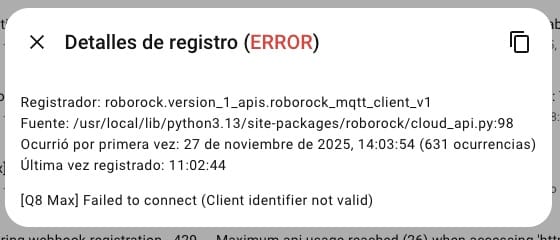
As we can see, it gives a pretty ugly MQTT error: «Failed to connect (Client identifier not valid)» which has also been repeated hundreds of times. Translated to human language means that Home Assistant integration tries to connect to Roborock cloud via MQTT and the server responds that the client identifier is not valid. I mean, it’s not that the robot is in energy saving, it’s that Roborock’s servers reject the connection.
Investigating a little for Reddit, It seems to be a bug known in version 2025.11 of Home AssistantBut at least we know that it’s not something we have wrong with our Home Assistant installation or the vacuum cleaner, but that A MORE VEZ, it’s a Home Assistant shit.
If it is that Then you say that if HomeKit is a shit, that if it’s too standing and doesn’t evolve, that if it integrates devices with count drops… that yes, that all you want, but it’s that these things don’t happen with HomeKit. It really bothers me when something is working out and, all of a sudden, it stops because someone has decided to change us in an integration… and this with Home Assistant happens to us every 2×3, we’ve already talked about it a lot of times. But, well, let’s see what we can do to have the vacuum cleaner in Home Assistant and then HomeKit and the Home App and not have to go to the official app every time, that I’ve invented a workaround. By the way, the ruling
It’s not just for S8 Max, is it? It happens with other models like the Q Revo, the normal S8 and a few more.
First tests for solution
The first thing we try is to generate a new client identifier, so we completely eliminate Roborock’s integration into Home Assistant, Home Assistant restart and install again with the Roborock account login and so on. All perfect, the robot is reconnected and it appears great… but after a few hours the same thing happens again with the same message from «Client identifier not valid» on the logs. –
The good news is that If we recharge Roborock’s integration, the cache reappears as connected and there is no need to redo the entire login process And so, so we’re gonna play with that.
Temporary solution while you fix it
What I’ve done is create an automation that automatically recharges this integration if the vacuum cleaner stays in ‘Unavailable’. I know it’s not a very elegant solution but we have no other solution until Home Assistant or Roborock’s integration is updated and solved in a definitive way, what will be done to him.
With our ñapa, instead of going by hand to Settings → Devices and services → Integrations and «Recharging» Roborock’s, it is the automation itself that restarts each time it detects that the robot has moved to Unavailable state. The automation itself is very simple, simply you have to tell him that the trigger is when the robot entity moves to unavailable state for 2 minutes, so we prevent a microchip from leaking it to us, and at that time that it runs the action that is to call the service of Recarga configuration input and return that of Roborock. In 1 minute you have it ready:
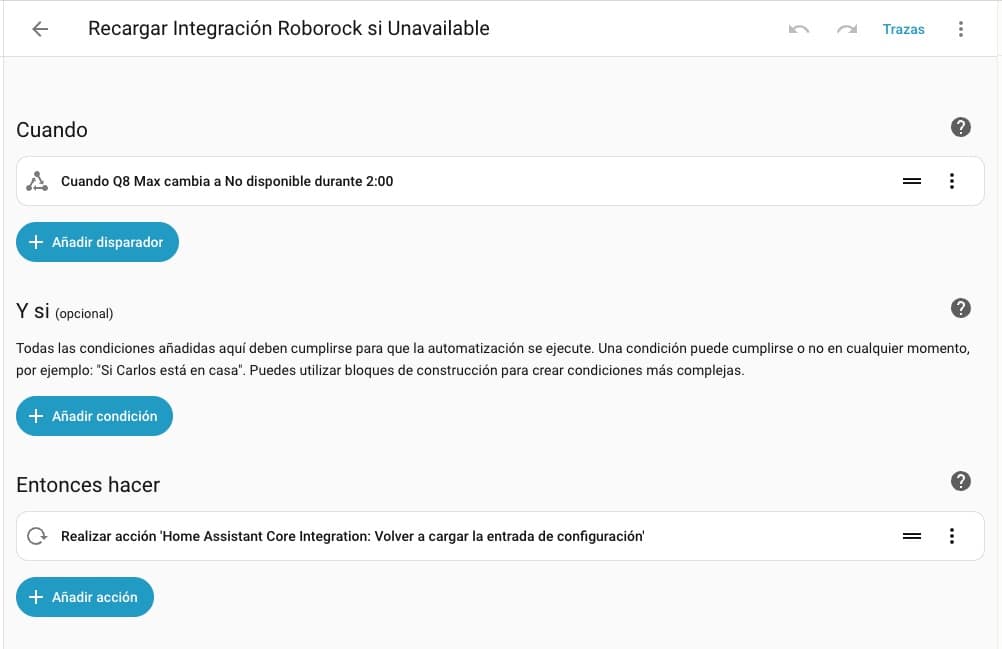
You save the automation and ready. From there, when the Q8 Max takes those 2 minutes «lost,» Home Assistant will recharge the integration and, if the problem is that of the MQTT session, the robot will again appear as available without you having to do anything. –
If you’re very pro and you’d rather see it in YAML format, the structure would be something like this:
alias: Recharge Roborock Integration if Unavailable
trigger:
– platform: state
entity _ id: vacuum.roborock _ q8 _ max
to: «unavailable»
for: «00: 02: 00»
action:
– service: homeassistance.
target:
config _ entry:
– name _ or _ id _ of _ the _ entry _ of _ roborock
mode: single
And now… to wait.
And little more can we do, just wait for the official fix. With this automation we get the vacuum cleaner back to being more or less transparent. If you’re a log maniac like me or like my friend Vidal Jacobo of the podcast From the ClockI understand you’re upset about the jump in the state of Home Assistant and the ugly lines in the log with the warnings., but in the end we will continue to have the robot available as if nothing had happened and we can continue to launch the automations from the home app or from Home Assistant without having to use the official app, which
You know what it gives me. repellus Because one day the vacuum cleaner doesn’t come out and you don’t know where the failure is coming from, so I recommend you always have the centralized automations in one place… I don’t care if it’s HomeKit’s home app or Home Assistant if you like the risk, but in any case it’s better than having the automations scattered each in your native app. Well, I don’t care, I’d like you all to have them on HomeKit’s house app or on the Controller for HomeKit… but I know there’s one thing that’s really cool at Home Assistant and it’s that next to automation it tells you the last time it was launched, which is really cool.
ong >
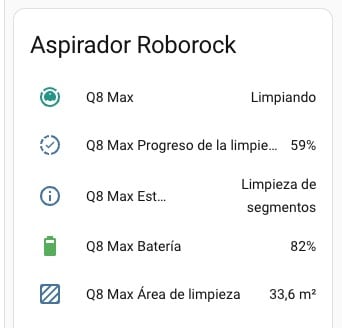
The notes in the version 2025.11 of Home Assistant already talk about MQTT client errors, so it is reasonable to think that the final solution will come in a version less than 2025.11 (at this time we go by 2025.11.3 and continue to fail) or at 2025.12 and they will fuck me up this entry that will no longer be green to lose its value. Home Assistant just makes me happy, man.
wp: block {«ref»: 1612} /
Carlos Sahuquillo
'Haga lo que haga en la vida, siempre compito' - Jacques Villeneuve Reserva una sesión →
Entradas relacionadas

15 preguntas de domótica que se repiten una y otra vez
He revisado comentarios del blog y correos de lectores para juntar las dudas que más se repiten sobre Shelly, HomeKit, Matter, Home…

Apple vuelve a por la casa: HomeView, HomePod mini 2 y Apple TV 4K
Apple presenta HomeView, HomePod mini 2 y un nuevo Apple TV 4K. Repasamos precios, disponibilidad en España y el futuro de Apple…

How to re-pair Zigbee sensors in Home Assistant without losing your automations
Swapping the battery wasn't enough to bring four Aqara sensors back to life. Here's how I re-paired them with ZHA without losing…
0 comentarios