Smart locks with kids
 Carlos Sahuquillo
·
25 abril, 2026
·
17 min de lectura
Carlos Sahuquillo
·
25 abril, 2026
·
17 min de lectura
Ep. 109 · escúchalo
0:00 / 18:41
Idioma:CastellanoEnglish
Today I want to talk to you again about smart locks, but not about their use as such nor about which lock is compatible with Matter or anything like that, but rather about their use and security when you have kids at home, following on a bit from the post a couple of weeks ago where I told you about the Tedee lock.
Smart lock security
In all these years messing around with different home-automation gadgets, I’ve only heard of one case where a lock opened «by itself» (note the «by itself» in quotes) and left the door open. This happened to Alex Barredo, podcaster at mixx.io and Kernel and a pretty tech-savvy guy, but the thing is, he swears up and down that his door opened by itself with a Nuki lock, and he even sent it back to the manufacturer so they could investigate what had happened. I never heard anything more about it, so my guess is it was a bad configuration or some weird automation that opened the door… Anyway, whenever we change a lock, we always worry about whether smart locks are secure, whether some bad actor could hack them, whether they use encryption, and of course whether they’re Thread, Matter, HomeKit or whatever… and then the real problem usually doesn’t come from any of that, but happens when someone at home accidentally touches something they shouldn’t, which is exactly what happened to me. As I told you the other day, one of my kids (Miguel, my favorite, which doesn’t mean he still is), opened the lock from the Apple Home app while we were all out of the house… And the door stayed open for a good few hours. It wasn’t wide open, but when the latch opened it swung slightly ajar—only noticeable if you looked closely—but anyone could have gotten in just by pushing it. As I told you the other day, you can imagine my wife’s meltdown, another one of those automations that nearly cost me my marriage. I still tear up thinking about it. So, after telling you the other day how the Tedee Go has been given a new lease of life thanks to Matter compatibility, today I want to talk about something quite a bit more important than the standard’s version or how it now looks prettier in the Home app: access management. It’s great to have the lock integrated into our ecosystem, but it’s even more important to have control over who can open it, from where, and under what conditions.The problem: permissions in the Home app
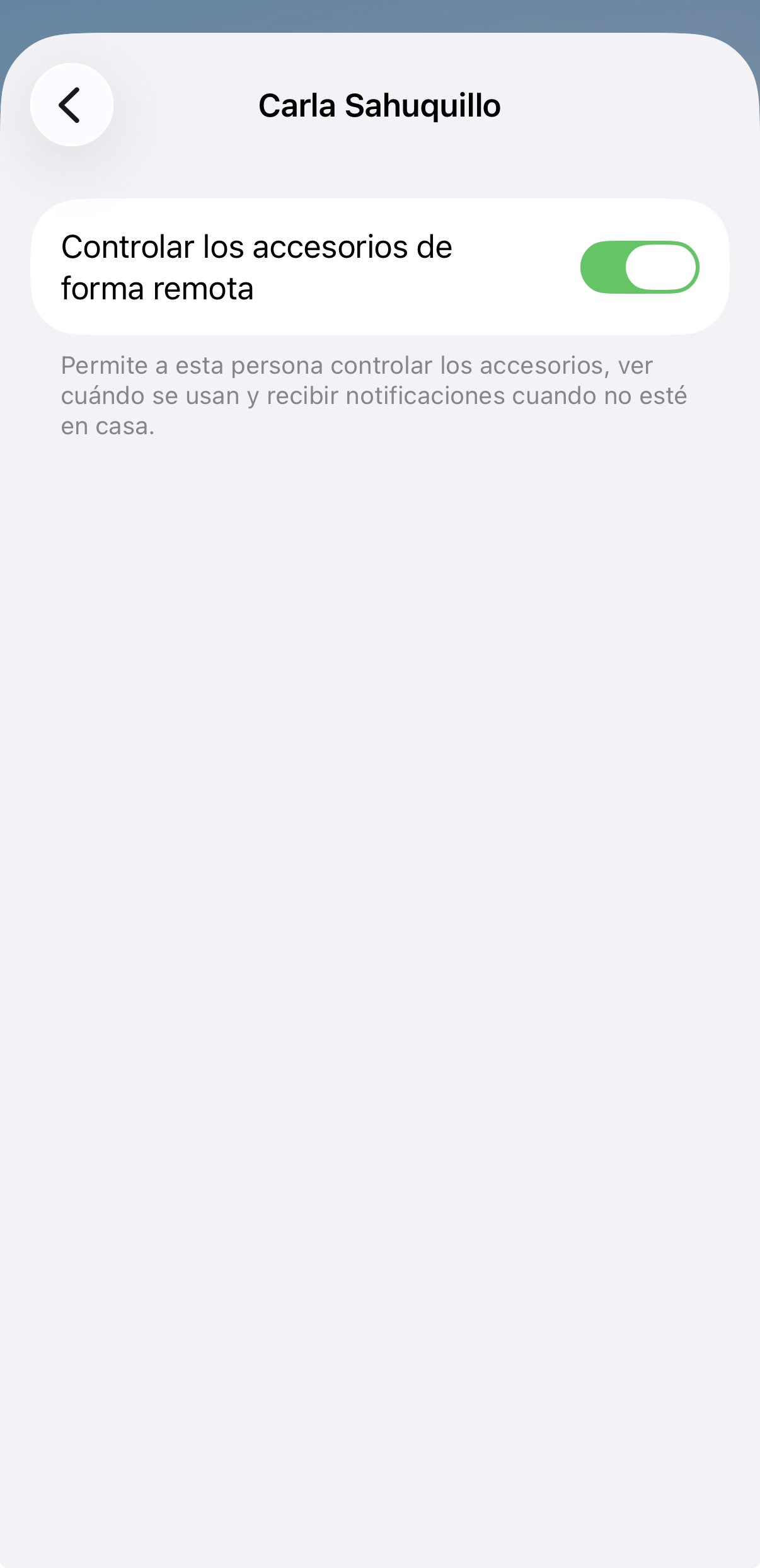
The problem with having the lock integrated into the Home app is that by default, anyone with access to the Home app will be able to open the door. No, don’t worry about Siri. That thing many people think—that with HomePods at home and a smart lock, someone could shout from the other side of the door «HEY LOLA, OPEN THE DOOR» and Siri would open it—is false. For Apple, a lock is a security device, and several conditions have to be met before it can be unlocked. Apple’s HomeKit hasn’t improved much in recent times—a few more supported device families, finer camera control, Matter compatibility… but its permissions model and privilege management remain its unfinished business. Since I have all my kids in the Home app, I can’t tell it «let my son Pablo only touch his own devices and these shared ones, but not let him mess with his brother by turning his light on and off»—that’s just not possible. The Apple Home app only distinguishes between Residents and Guests. Residents have full access to everything, always, while Guests only have access to locks and other security-related accessories, and only within a defined schedule. This Guest profile is designed for cleaning staff or one-off jobs that need entry during the day or night and not much else—you can limit the entry hours… but that doesn’t work for my kids. And with Residents, as I said, you can’t say «lights yes, but not the lock.» What we can do in the Home app is go into those users’ settings and switch the ‘Control accessories remotely’ parameter to NO, so that from outside the house they won’t be able to access anything.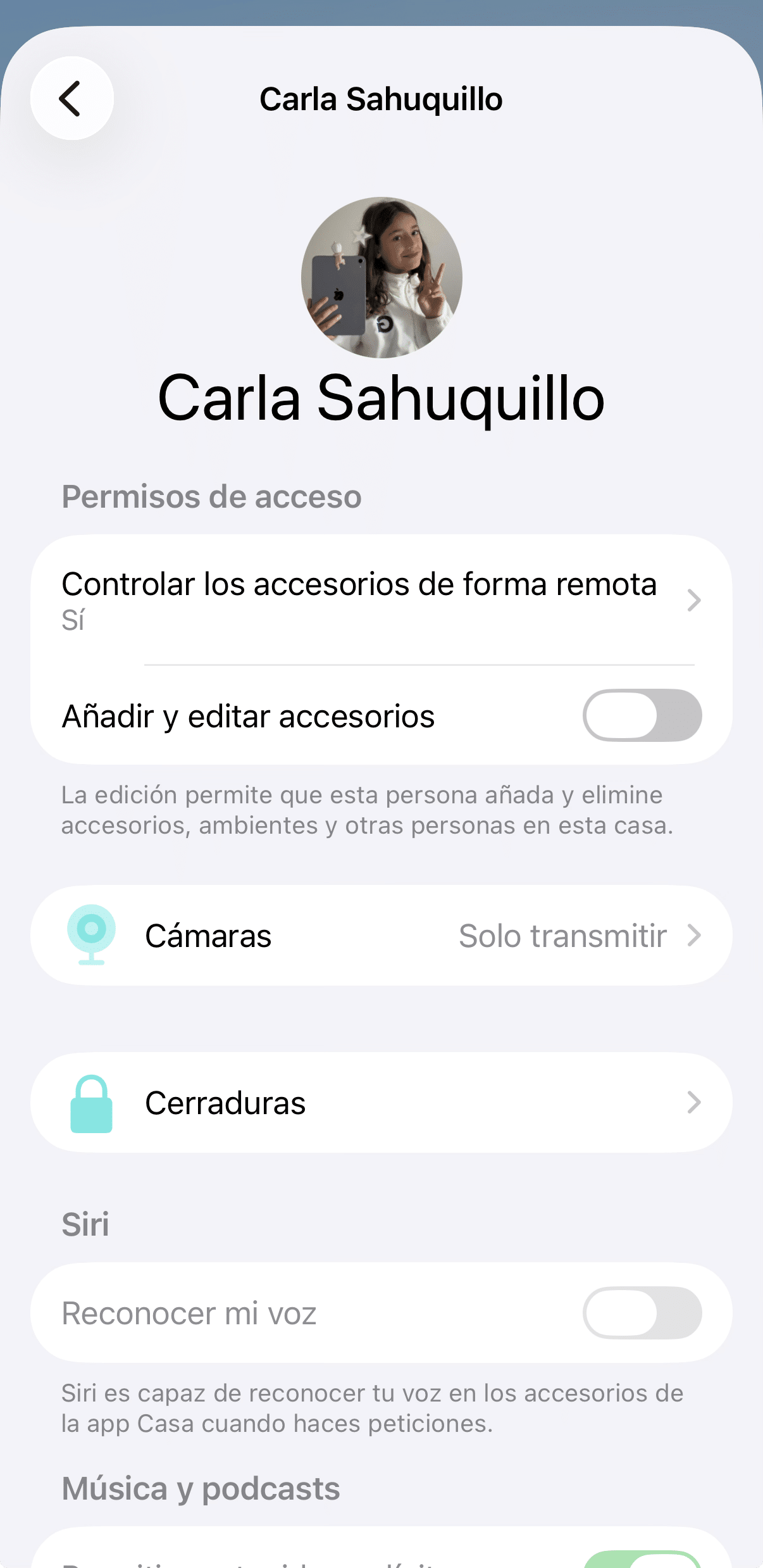
What about with Home Assistant?
With Home Assistant things change, although there are a few things to keep in mind. Automations in Home Assistant work with triggers, conditions, and actions, and they can also use person or device_tracker entities, zones, states, schedules, and all kinds of conditions to control when something can happen and when it can’t. So with Home Assistant you can create a custom button or script that only works if your kid’s device is at home or in the home zone you can define, so that if they try to trigger it while not at home, it simply does nothing. Or you can make the «open» button only appear when they’re home and stay hidden the rest of the time. You can also add schedules so it can’t be opened at ungodly hours, or require the presence of the rest of the family so the door can’t be opened if there’s no adult at home (from the automation’s point of view, of course—they can always walk up to the door and let their girlfriend in themselves). The only thing you need to keep in mind is that you can’t expose the lock’s direct entity, only the automation, since the lock entity—which is what the lock is called, with its little open/close button—doesn’t allow you to add a condition… so you have to create a script or automation that checks certain conditions before performing the unlock… but of course, with Home Assistant this is very easy to do. You can even set it up so that if the condition is met, the lock opens, but if not, you get a notification saying «Your son Pablo not only failed math, he’s also trying to open the front door from school.» I recently discovered conditional cards in Home Assistant, which is what I meant about being able to show or hide devices based on conditions. Honestly, Home Assistant is really great, it’s just a shame it still doesn’t have high availability and you have no choice but to delegate all your home automation management to a single box… which shouldn’t break, true, but for example Antonio, a neighbor of mine who bought a Home Assistant Green after we did a Home Automation Consultation for him… well, a few days ago his Home Assistant Green box died! I’d never seen a failure like that before—it simply wouldn’t boot, giving a loading error complete with a segmentation fault, and when he tried to reinstall it, it also failed during the installation process. It looks like a physical RAM problem, since it couldn’t even boot from the memory card—and mind you, in Live mode it doesn’t use local storage… but it does use RAM. Anyway, he had to call the manufacturer and they’re sending him a replacement… but so he wasn’t left stranded, since he uses it to manage a bunch of irrigation and temperature sensors, we installed Home Assistant on an iMac he has in his office. Yeah, that versatility is great, sure… but imagine the fright and the rough time you go through until you get it installed on a VirtualBox on your desktop computer, restore a backup, and see that more or less everything’s working again… those couple of hours feel like an eternity. Anyway, back to what I was saying, those conditional cards let you show or hide things based on conditions. My kids don’t need to see the lock when they’re away from home. And even less so the cameras—can you imagine me and my wife having a little «cat and mouse» moment at home, enjoying some privacy, and one of the kids logs into the cameras… Well, actually yes, maybe one of them is knocking at the door because their phone died or God knows what, and I want to let them in from the office, I don’t know… but for example I don’t need to open the garage door unless I’m actually driving up to it, so I can show and hide that one. I don’t know, you can do some interesting things with this, as you can see. Keep in mind that this also has to do with the permissions you give your kids in Home Assistant, of course. If they can go straight into the settings and search directly for the lock device—the lock entity—even if you don’t show it on the dashboard… well, you’re screwed, obviously. That depends on how much effort you want to put into the permissions… well, and keep in mind that wherever permissions fall short, you always have the option of the good old paternal smack upside the head, that great forgotten tool. Wait, speaking of the paternal smack, once years ago one of my kids did something or other and got a slap… and later on he claimed he was an abused child. Anyway. So I told him, ‘Look… once when I was a kid, I was at my grandparents’ house messing around with my brother… my mom yelling at us to cut it out… suddenly my brother started crying and I ran off as if I had nothing to do with it… and my dad, who saw me running through the garden while my mom was shouting at me and my brother was crying, threw a tool at me—a trowel—that got stuck in my leg. Literally stuck in it. And I limped away from there… and that wasn’t abuse either! I deserved it!» Man, I swear some things that worked just fine have gotten lost these days. Anyway. Back to the topic, you guys keep getting me sidetracked!What if I don’t have Home Assistant?
What about people who don’t have Home Assistant and don’t want to open this can of worms? Like my friend Txarly, whom I’ve mentioned many times, also a neighbor in Colmenar. Well, we have the option of using the Tedee app… and what can I tell you, I’m anti-apps, I prefer having everything in one nice, unified ecosystem, either Home Assistant or HomeKit, so I can build conditional automations and all that… but the Tedee app is amazing! And you have no idea how much that annoys me!The Tedee app
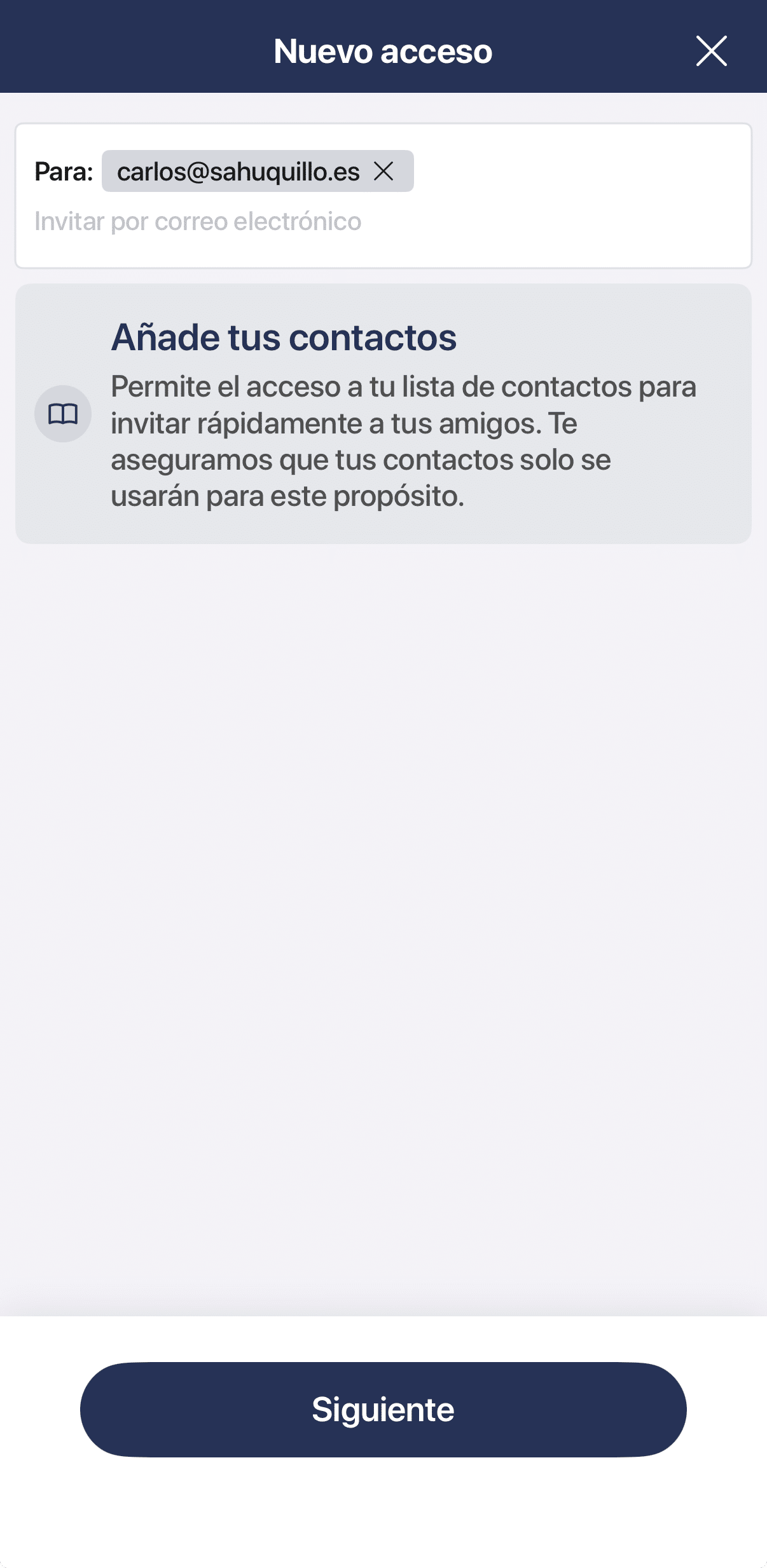
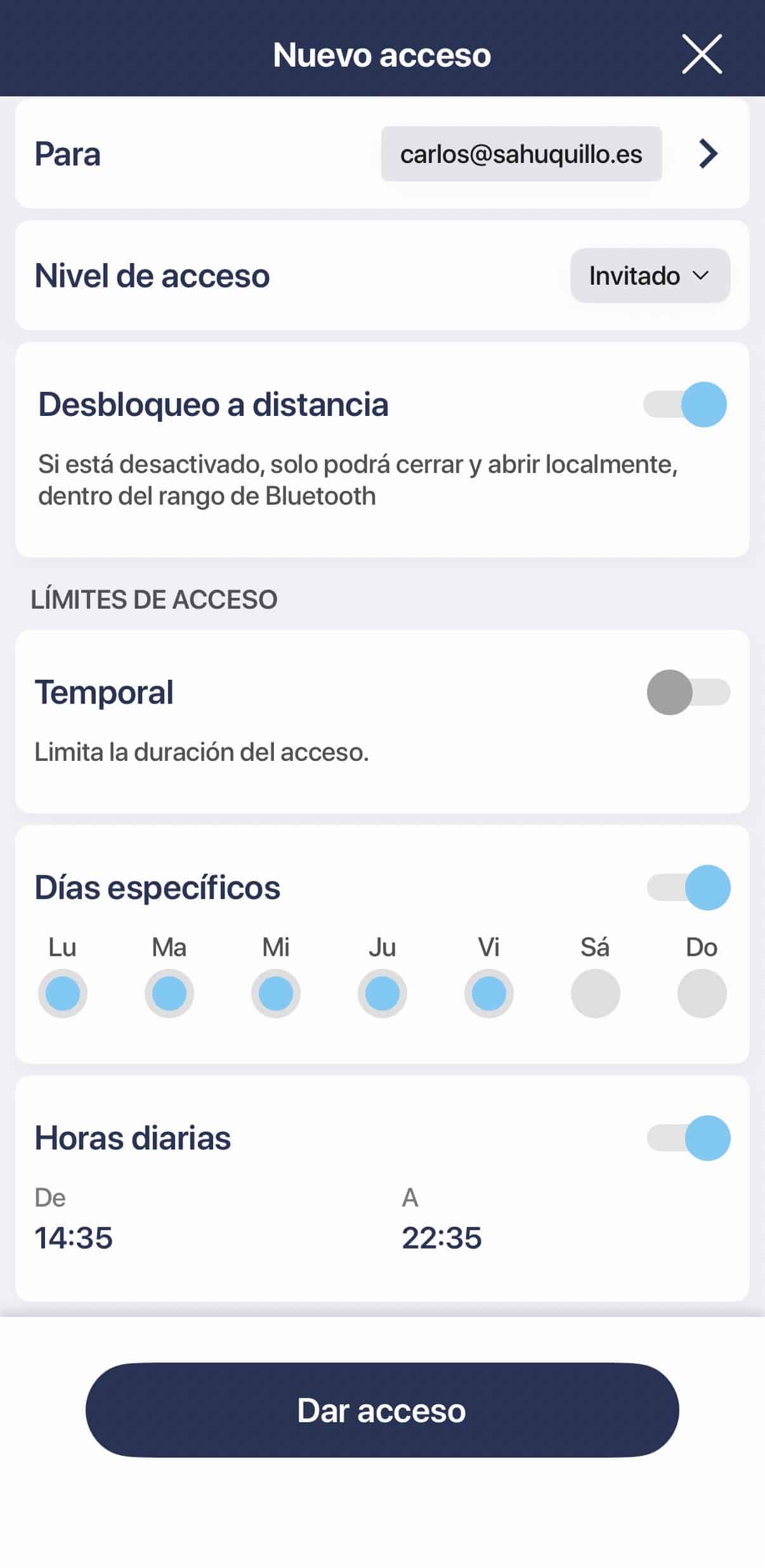
The thing is, the Tedee app lets you do a ton of very «lock-specific» things, so to speak. Remember, we can’t uninstall it completely because the option to calibrate the lock isn’t available in Home Assistant or HomeKit, only from the app… so, well, you’re going to have it anyway, but it also lets you create users with different access levels. You can, of course, allow the cleaning staff or the painter who’s going to be at your house for a few days, or the gardener, to only enter at certain hours; you can of course disable remote unlocking… but on top of that, it has a really cool feature: you can set a specific user so they can only unlock the door IF THEY’RE CONNECTED TO IT VIA BLUETOOTH! Damn, this seems amazing to me, honestly, it’s the perfect solution! Not just for my kids, but also for the cases I mentioned before, like cleaning staff, maintenance people, your parents staying at your house for a few days because they live far away… not to mention if you have that lock at a place you rent out on AirBNB or any other app. Plus, you can limit access by dates, days, view activity logs and know exactly who opened the door, which you also can’t do from the Home app… have access automatically revoked on a certain date, revoke it manually yourself if that person shouldn’t have access anymore or if your kid lost their phone or whatever else comes up… honestly, I’d love for all of this to be manageable from the Home app, but I’m afraid we’re YEARS away from that level of granularity, while the folks at Tedee have been making nothing but locks for years and know exactly what us users need.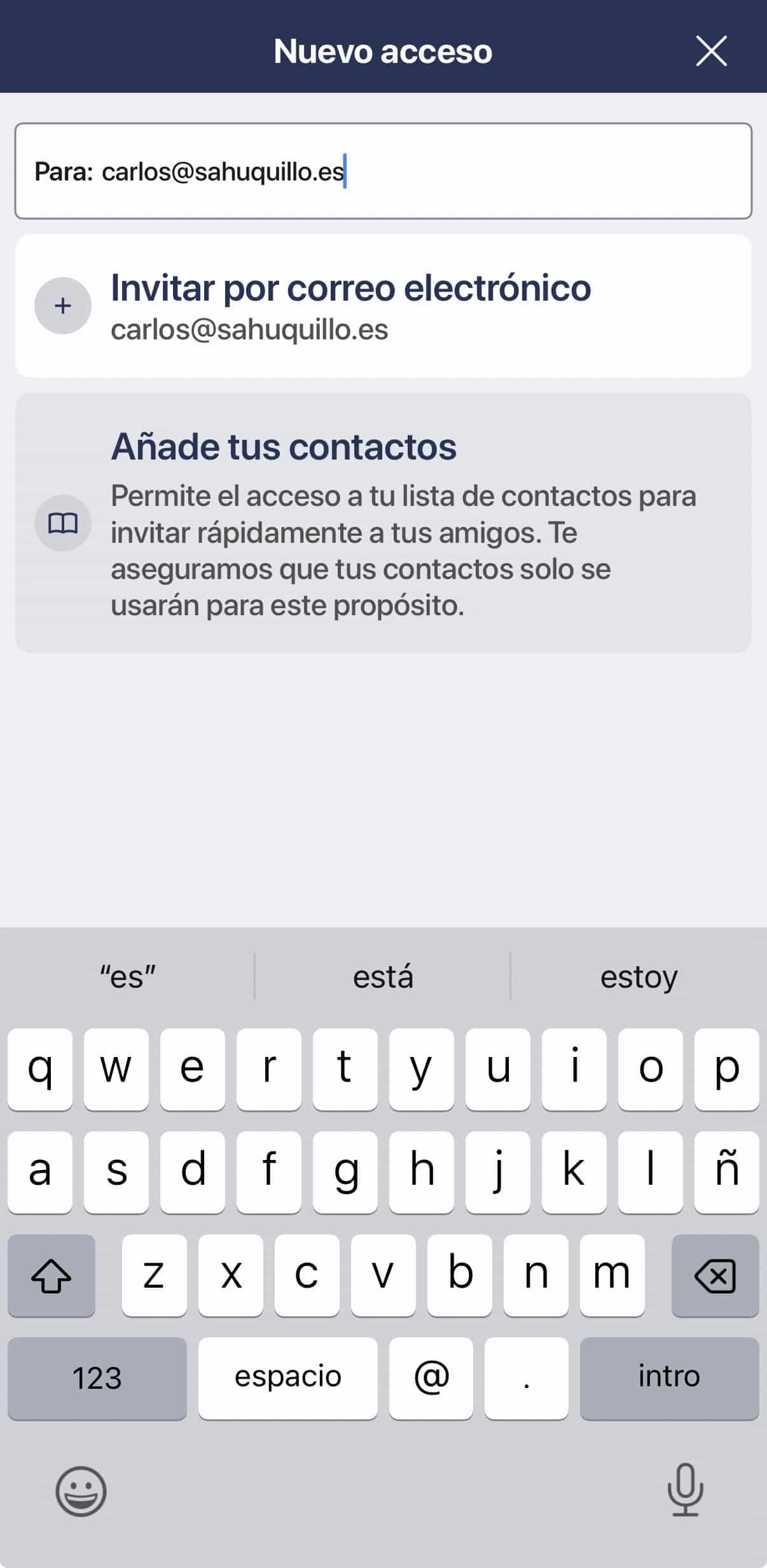
What about with an advanced Shortcut?
Some of you have asked me before, either in the Telegram group or during a Home Automation Consultation, whether this couldn’t be done with a HomeKit Shortcut so the lock only works if the person is home or connected to the wifi because they’re right in front of the door and their phone has already connected. And yes, it can be done with a Shortcut in an automation, but that doesn’t actually intercept a user’s manual tap on the lock in the Home app. You can automate things that happen after that unlock… I don’t know, have the lights turn on when the door opens, send a notification, or even try to lock the door back up if you detect something odd, but you can’t tell HomeKit «if this kid of mine, who’s set up as a Resident, taps the lock from outside the house, block the action and don’t execute it.» That kind of authorization model doesn’t exist as such in Apple Home, at least not for now.What about with Controller for HomeKit?
With Controller for HomeKit, which as you know is, in my opinion, one of those apps that should come preinstalled on every iPhone, you can fine-tune things and adjust more aspects of the automation, which as you know now supports advanced logical conditions, IF/ELSE-type conditions, and with the paid Plus version they’ve released, you can even run automatic workflows that give us some extra cool features. For example, you can set it up so that if the lock opens and there’s no one in the home zone (which you can also adjust with whatever radius you want) or it shouldn’t have opened at that hour, you get an immediate critical notification, the kind that rings even if your phone is on silent. You can also build a workflow so that if the lock unlocks and certain conditions aren’t met, it locks itself again after a short delay. You can add context, logical combinations, schedules, presence, and the states of other accessories… but what you can’t do is change Apple’s security model and say that my son Pablo doesn’t have permission for this specific lock but does for the rest of the house. In other words, it’s all reactive measures… but the lock has already been opened. So, if you ask me what the best option is… I’d say that if you don’t have your building intercom automated, just give them access in the Apple Home app but without the option to use accessories remotely. This won’t stop them from getting on each other’s nerves by turning lights on and off… or any other nonsense, man, because my oldest son once got the bright idea to go upstairs with his girlfriend, and his rotten brothers set his bedroom light to red and started playing romantic songs on his HomePod… but anyway, with this you’ll at least make sure they don’t accidentally open the front door from your second home. If you do have your building intercom automated with a Ring or similar, then you can’t disable this option (well, you could always give them both apps, the Ring one and the Tedee one with its access management… but at that point we’re segregating things too much and complicating their lives, since they’d have to open several apps just to get into the house and turn on a light). In that case, the best option is to use the Tedee app to open the door only via Bluetooth, and everything else through the HomeKit Home app… but remember not to publish the lock in the Home app, okay? EVERYONE will have to use the Tedee app to get in. And if you have Home Assistant, then go ahead and spend some time wrestling with your kids’ user permissions and smart cards so that the option to open the lock only appears via a script or automation when they’re near home, but they can’t reach it directly from Settings or by calling the lock device. You see, the Home app looks really nice, really clean, very Apple, so to speak… but it falls really short in a lot of ways. It’s a shame, because I like having just one app for everything, but what can you do… And no, I’m not going back to using Home Assistant as my base, since my NUC might die on me the way it did on Antonio with his Home Assistant Green, and that would definitely cost me my marriage… I think I’ve already pushed my luck enough, I don’t even want to imagine what would happen if something that serious happened and left me without home automation… or if the door got left open again with nobody home.¿Necesitas ayuda con tu domótica?
Te ahorro tiempo, dinero y disgustos. Sesiones de consultoría desde 60€.
Carlos Sahuquillo
'Haga lo que haga en la vida, siempre compito' - Jacques Villeneuve Reserva una sesión →
Sigue leyendo
Ver todo el blog
Entradas relacionadas
3 septiembre, 2026 · Domótica
Leer
Webhooks and workflows in Controller for HomeKit
Kicking off Season 4. I'm picking back up the automation for the sensor that kept running out of batteries that I told…
Ep. 111 · escúchalo
0:00 / 13:12

27 agosto, 2026 · Domótica
Leer
How to tell if your kid is sneaking into your room without having a camera
I bought the Aqara P2 presence and light sensor with Matter, and I've got it running simultaneously on HomeKit and Home Assistant…
Ep. 110 · escúchalo
0:00 / 12:16

9 abril, 2026 · HomeKit
Leer
Tedee lock compatible with Matter
Tedee's compatibility with Matter had been promised since 2023 but has finally landed. I tell you how to update a Tedee Go…
Ep. 108 · escúchalo
0:00 / 12:23
0 comentarios