The safest method to block and unlock the mobile
 Carlos Sahuquillo
·
30 agosto, 2017
·
9 min de lectura
Carlos Sahuquillo
·
30 agosto, 2017
·
9 min de lectura

After the article the other day when we talk about A A contacts on the mobileSome people (I wish I could say ‘many’, but they still don’t read me: D) have asked me about the safest method to block / unlock the mobile.
I’m not gonna tell you the NEED to carry the phone blocked, it seems to me that it is quite obvious that we have a lot of information about our private life on our mobile, photos of our children, bills of services that we have received by email, sometimes we have access to our bank account… and of course they can get us into a mess simply by sending the photos of Whatsapp of the group ‘Amigotes’ to that group called ‘Sahuquillo Family’. There’s no one coming down from the 3 or 4 breaks.
We should not just think about the possibility of losing your cell phone (which also) or that they steal it from us, can also happen that someone of our trust takes it while we’re out of touch and has access to that information.. For example, I have a photo folder of some of my friends in ‘difficult’ situations that is called ‘Possible future extortion‘. If one of those friends could take my phone, I’d probably delete that folder, endangering my retirement and my kids’ bread. Can’t be, access to the device must be protected.
What is the best method to block access?
There’s different systems device lock. From the typical numerical code through more complex codes, patterns drawn on the screen and even the fingerprint or facial recognition. This last facial recognition system seems to be going to be the that cuts the cod in the future since one face has 250 unique points in front of 40 that has a fingerprint… but that’s what we’ll talk about, I’m in.
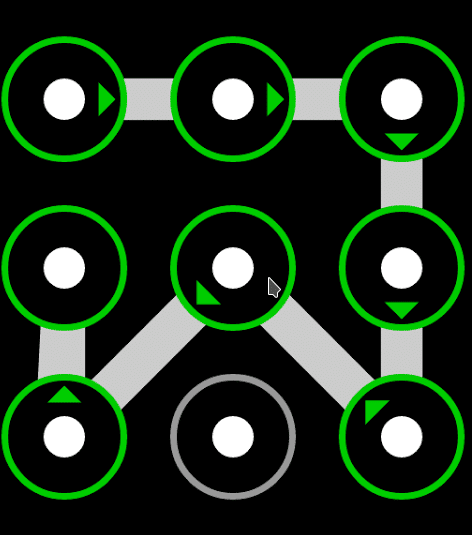
A lot of people I know carry a pattern of unlocking on your Android mobile, which is a security problem… not by the method itself, which is completely safe, but because most of them use a pattern as simple as a password chosen by them., which makes it too predictable or easy to remember: initials of your name, initials of your husband’s name or of any of the children… and that’s it, so anyone who knows you a little could unblock it in a matter of seconds and a few attempts:
If we talk about people who use 4-digit numeric code we are in the same, too simple a code that usually corresponds to car registration, birthday dates or even bank card PIN (I swear, I’ve seen it… what’s scary?)
I am not saying that we should not use these two methods, we should simply follow the same advice We saw when we generated safe passwords. and create a less predictable release pattern or numerical code.
There is also the possibility of introducing a alphanumeric code, something similar to the computer’s password, although this method is not used by many people despite how familiar we are with the passwords on the computer… I have the impression that it is not valued just as someone can access our computer (which seems super- dangerous) that someone can access our mobile (when there is actually much more information we should protect on the latter).
Security vs Privacy
I don’t know if you remember. the case of San Bernardino. Basically, there was a shooting in the United States and the killer who shot several people was carrying a code-protected iPhone. The FBI has a very cool machine capable of typing a lot of codes per minute, starting at 0001 and ending at 9999 until it gets the phone unlocked. It’s kind of a giant finger and very fast. The case is that they wanted to access this device to see if they found more information about the shooting, future plans, motivations, etc., and they found a
a functionality that Apple has by which if someone fails 10 times the unlock code, the phone is formatted:
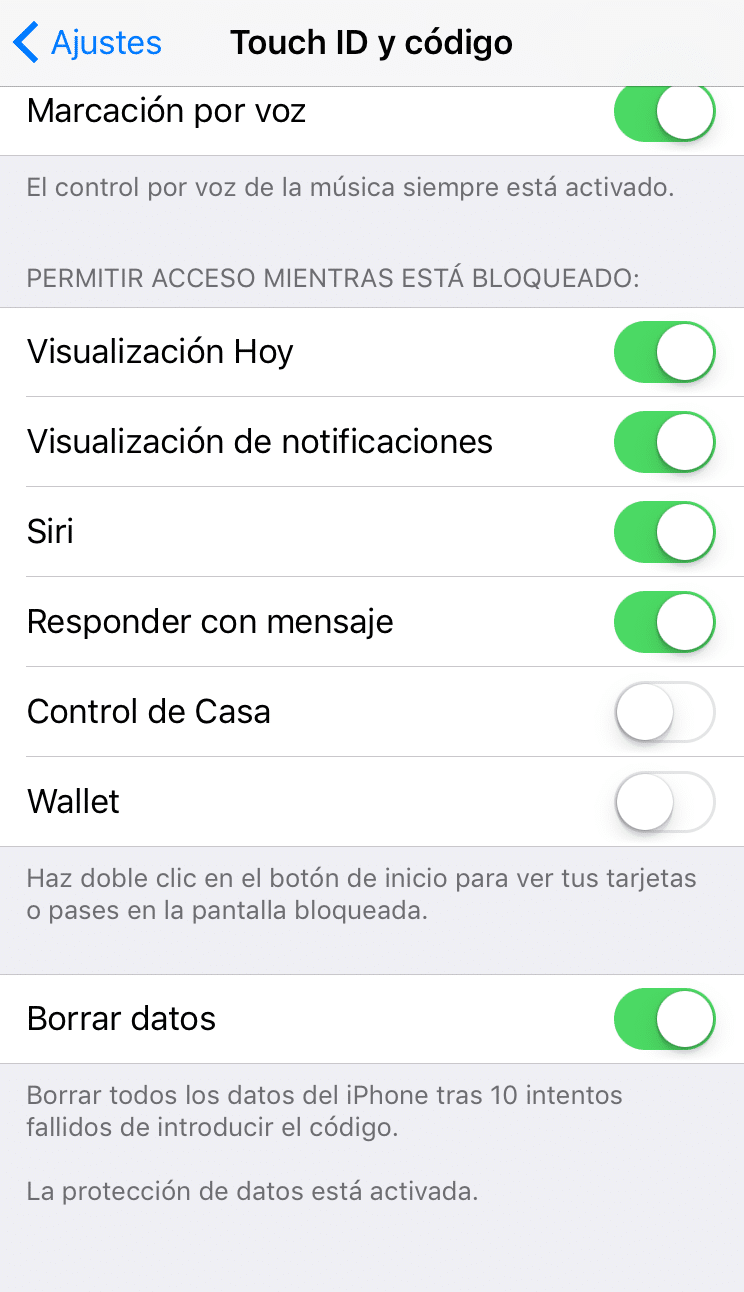
What’s cool? Apple knows you can’t be so clumsy, If you’ve been wrong 10 times in a row, it’s because it’s not you, so remove all the information from the phone. Just in case. In the event that it’s you and that day you’re a little out of touch, you just need to enter your AppliID again so that your last backup is automatically installed with all the applications, images, tones and notes you had before formatting. It’ll look exactly like you had it before.
[OFTOPIC] The FBI asked Apple to do a version of the system that would not be formatted if the code failed and Apple said no, that if they did that it would be a matter of time for it to spread, with the consequent danger to its users. The FBI was very angry, threatened with trials and so on… but Apple kept saying no. Have you ever heard the FBI ask Google for help in accessing an Android mobile? Think about why.
You’re making me dizzy. So what method do I use?
For comfort, speed and security, if your mobile has a print reader or TouchID, I recommend you use that method. If you have a newly purchased mobile with facial recognition or iris reader, it’s also worth it. The idea is to use biometry. Now, now, you don’t have to remind me that this blog is for everyone, so what the hell is that about biometry?:
In information technologies (IT), «biometric authentication» or «computer biometry» is the application of mathematical techniques and statistics on the physical or behavioural features of an individual for authentication, i.e. «to verify» his or her identity.
The main advantage of using biometrics (our footprint, our eye or our face) is that No one will be able to unlock our phone unless we add their print, iris or face.. I, for example, have my older son’s fingerprint added, in case something happens and you have to unlock it because I can’t, although in a few years I will explain to you how emergency contacts work and how to call your mother from this function in case something serious happens. I said something serious, the ‘I don’t have the wifi.‘is not serious, so I have to wait until I am able to differentiate what I consider ‘serious’ from what
and he considers it ‘serious’.
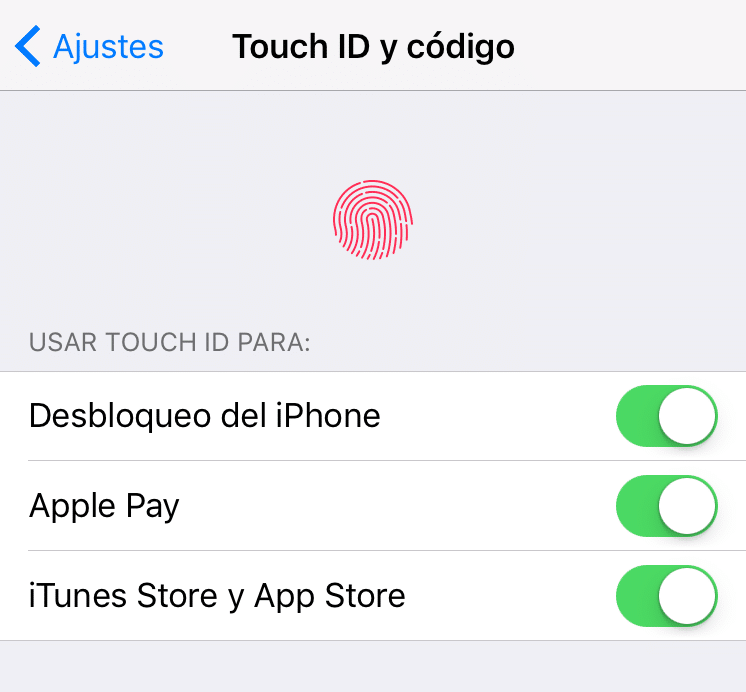
The technology used in these methods is based on security and availability I mean, you’re always gonna be able to unlock your cell phone even if your hands are a little wet in the case of the print or you have a fresh-up face after a jarana night… the facial recognition will still know it’s you. Just like your mother knew the next morning that it was you and she also knew that the night before you had been a gardener. Pure magic. Needless to say, both methods are faster than unlocking with a PIN or a code. Another advantage they have is that He informed her.
n biometric is stored on your own device, do not ‘travel’ through the cloud to Apple, Google or Samsung to store it there… there is a safe and physical storage space on your phone where this information is stored, so if you change your phone you will have to reregister the print / face / iris in the new terminal.
I’m a paranoid, what if I have an accident and my face doesn’t look like my face?
In case something happens to your face (no, the grain that has come out on your forehead does not count) or you have very cold hands and the reader is not able to recognize your footprint (they work within a temperature range so that no one can cut your finger to access your phone… it sounds bad but it’s for your sake, I don’t think that actually happens.. at least none of us), always you can choose an alternative access method, usually a code which must be safe enough because of the fact that the safety of a chain is the same as the safety of its weakest link. If we use our smell
a to access the phone but as an alternative method we put the code ‘1234’… because bad we go, means that you have learned nothing after everything you have read on this blog.
And at this point, I want to think that you’re adding your prints on your compatible devices or adding a secure and complicated code as an alternative method, right? Well, I don’t entertain you anymore, we keep talking next day about payment methods on the mobile and how biometrics can help us in these menesters;)
Carlos Sahuquillo
'Haga lo que haga en la vida, siempre compito' - Jacques Villeneuve Reserva una sesión →
Entradas relacionadas

Low-cost remote work
Lowcost remote work, Chernobyl, and the importance of not running security tests in a rush and under pressure.
Leer
Mounting a MESH network compatible with Apple HomeKit
You have problems with your wifi and you've thought about setting up a mesh network? The eero router solves this and is…
Leer
Shelly for shutters: the 2.5 guide, HomeKit, and Matter (2026)
Got motorized blinds but want to automate them? In this post I explain how to use the Shelly 2.5 to get this…
Leer
0 comentarios