Thread devices in HomeKit and Home Assistant
 Carlos Sahuquillo
·
5 febrero, 2024
·
8 min de lectura
Carlos Sahuquillo
·
5 febrero, 2024
·
8 min de lectura
Ep. 66 · escúchalo
0:00 /

Idioma:CastellanoEnglish
As you’ll remember, a few days ago we were talking about Nanoleaf bulbs. I told you that my Nanoleaf Essential model, bought at least 2 or 3 years ago, was Thread compatible but had never been updated to Matter.
Some of you pointed out that this is indeed the case—that Nanoleaf released a first version with Thread and Bluetooth (in case you don’t have a Thread border router), but it never got a Matter update. Not too long ago, they released an update to those same bulbs that also connect via Thread but are additionally compatible with Matter, leaving my model in the dust. By the way, they’re EXACTLY the same, the only external difference is the logo on the box—mine says they’re Thread and compatible with Apple HomeKit, while the new ones say Thread and compatible with Matter. The bulb itself is exactly identical too, but the QR code printed on the new ones is a Matter code instead of a HomeKit one. You can find the new Matter-compatible model on Amazon for €19.
The thing is, I’ve been running tests these past few days and there are some important differences between pairing the bulb directly with HomeKit through the Apple Home app versus pairing it with Home Assistant in order to then bring it over to the Home app from there.
First: pairing the bulb from the Home app or from the Nanoleaf app
If we do the first option, meaning pairing the bulb with Apple’s Home app or through the Nanoleaf app, it directly looks for a Thread border router and detects any modern HomePods or Apple TVs we have on our network, so if we have them, it activates Thread support right away and connects to the Thread network formed by our HomeKit devices. You know, the Thread network that the HomePods and Apple TVs create—in my case, a network with 6 devices running in high availability.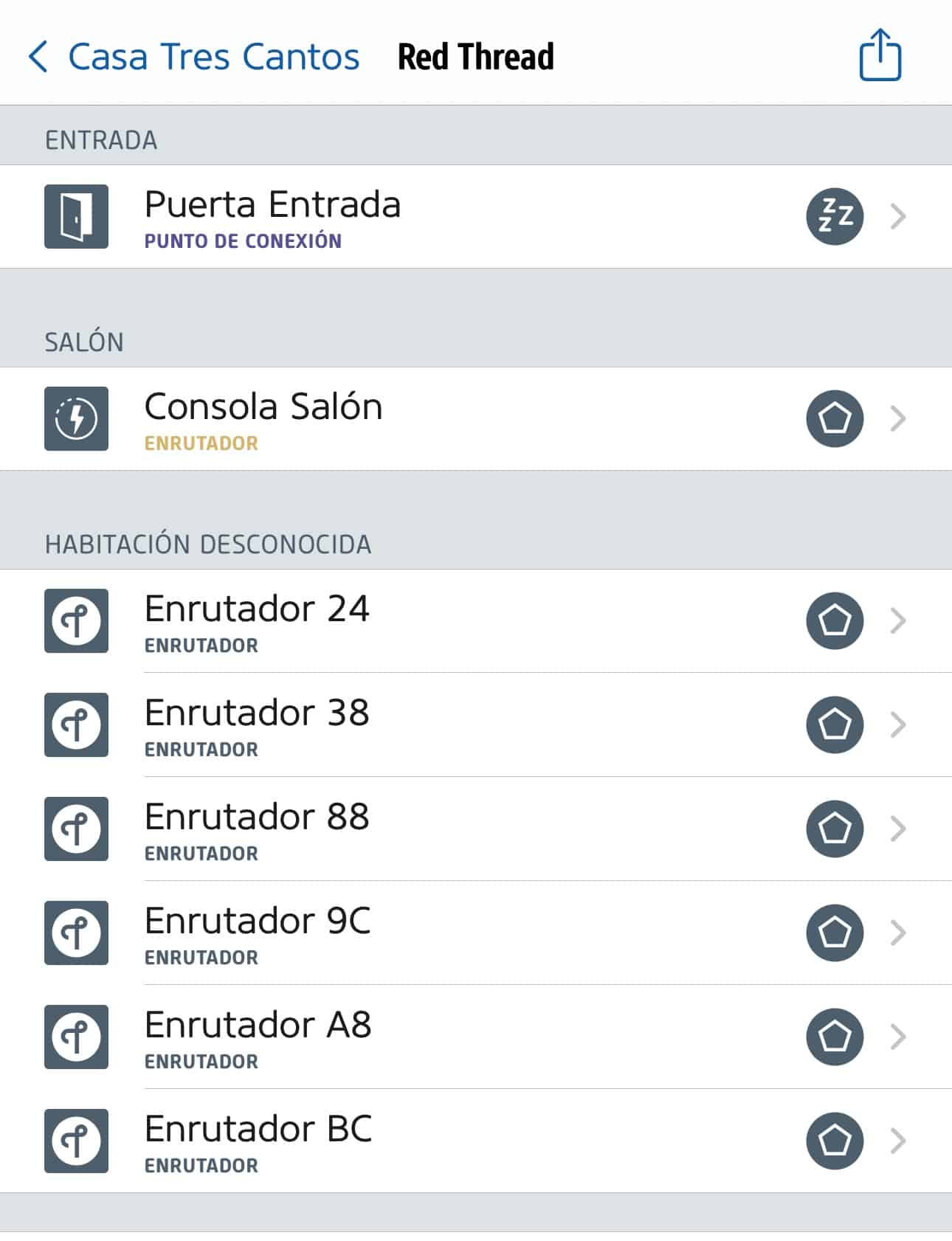
Pairing it with Home Assistant via Thread
Once we put the bulb into pairing mode—for anyone who doesn’t know, Nanoleaf devices are reset by cutting the power for 3 seconds, powering it back on for less than 2 seconds, cutting the power again for 3 seconds, powering it on again for less than 2 seconds… and so on 5 times, so that the last time we power it on, the bulb turns red and blinks to indicate it’s in pairing mode. The thing is, at that point, we need to add it to the Home app or the Nanoleaf app. I recommend doing it through the Nanoleaf app because from there we can see which Thread networks we have—in my case, the one generated by the Apple devices with a bunch of devices on it, and the one generated by Home Assistant’s Sky Connect. The Home app doesn’t give us any information about the connection protocol, it’s pretty sparse on details. The thing is, this way, the bulb will join Apple’s Thread network. All good, it’s a robust network made up of a bunch of devices. From here we can’t tell it to join the Sky Connect’s Thread network… but do we really want to do that anyway? It’s a network with just one border router, while in the other one I have a bunch! If for whatever reason I restart Home Assistant, or something breaks or goes wrong with the Sky Connect, I’d lose connectivity. As you know, Thread devices form a mesh network and provide coverage to each other, but you always need at least one border router on the network. Even so, we could turn off the HomePods and Apple TVs and the bulb would join the Home app using the Sky Connect as the Thread border router. Alright, so once we have the bulb paired with the Home app one way or another, it’ll already be connected via Thread and working great… but we want it to reach Home Assistant, for which we’ll need to DELETE the bulb from the Home app WITHOUT RESETTING IT, and within a few seconds Home Assistant will discover it and we’ll see that it’s connected using Thread. Watch out though, because if we restart it or put it into pairing mode again to link it with Home Assistant after removing it from the Home app, it won’t join via Thread—it’ll connect via Bluetooth instead. For it to connect using Thread, we need to remove it from the Home app and not restart it or do anything else until Home Assistant detects it. It’s as if the bulb has the Thread network cached, and once removed from the Home app, it tries searching for it again, and that’s when Home Assistant picks it up—but if we try to add it directly from Home Assistant, the Bluetooth protocol takes priority, likely due to a bug in Home Assistant’s Thread implementation. Obviously, from Home Assistant we can now publish it to the Home app using the usual HomeKit Bridge, just like any other bulb, and we’d have it in both apps. If you’re wondering which network I ended up pairing these devices with, I’ll tell you that I left it on Apple’s Thread network, the one formed by the HomePods and the Apple TV. At the end of the day, it’s a network with a bunch of devices that gives me more confidence than the Sky Connect’s. This doesn’t mean I never want to use the Sky Connect as the Thread border router and connect all devices through that network, but for now, as long as I keep the HomePods and Apple TV, it’s not possible, because you can’t tell these Apple devices to join an existing Thread network like the one the Sky Connect creates—Apple devices will ALWAYS create their own Thread network. It’s funny to see this from the Nanoleaf app, because it tells me I have 3 Thread networks: first, the one created by the Nanoleaf devices, identified by a silly name like white_truth_95; then the Sky Connect’s, identified as Home-Assistant; and third, the one from the Apple devices, identified as MyHome plus a random number, where you can see all the Apple devices acting as border routers. This doesn’t mean the Sky Connect isn’t worth it, though, eh? Keep in mind it’s a multi-protocol gadget, so we can use it in Home Assistant to connect both Zigbee and Thread devices. It’s ideal for someone setting up their home automation network from scratch who doesn’t have any HomePod or Apple TV, but as we discussed the other day, at the end of the day Home Assistant is a single point of failure with no high availability, and if the SkyConnect dongle breaks or something goes wrong with the physical device running your Home Assistant installation, you’ll be left without a network until you replace it… whereas if you have all your devices in the Home app under pure HomeKit, every single HomePod in the house would have to break for you to lose your network… as long as there aren’t services that absolutely depend on an internet connection, of course, since with Home Assistant this can be limited much more, keeping all the intercommunication between devices and the smart home hub local, whereas with HomeKit that’s not always possible.¿Necesitas ayuda con tu domótica?
Te ahorro tiempo, dinero y disgustos. Sesiones de consultoría desde 60€.
Carlos Sahuquillo
'Haga lo que haga en la vida, siempre compito' - Jacques Villeneuve Reserva una sesión →
Sigue leyendo
Ver todo el blog
Entradas relacionadas

22 octubre, 2026 · Domótica
Leer
15 preguntas de domótica que se repiten una y otra vez
He revisado comentarios del blog y correos de lectores para juntar las dudas que más se repiten sobre Shelly, HomeKit, Matter, Home…
Ep. 116 · escúchalo
0:00 / 22:46

15 octubre, 2026 · Domótica
Leer
Apple vuelve a por la casa: HomeView, HomePod mini 2 y Apple TV 4K
Apple presenta HomeView, HomePod mini 2 y un nuevo Apple TV 4K. Repasamos precios, disponibilidad en España y el futuro de Apple…
Ep. 115 · escúchalo
0:00 / 19:51

8 octubre, 2026 · Domótica
Leer
How to re-pair Zigbee sensors in Home Assistant without losing your automations
Swapping the battery wasn't enough to bring four Aqara sensors back to life. Here's how I re-paired them with ZHA without losing…
Ep. 114 · escúchalo
0:00 / 19:22
0 comentarios