How to create safe passwords
 Carlos Sahuquillo
·
13 julio, 2017
·
7 min de lectura
Carlos Sahuquillo
·
13 julio, 2017
·
7 min de lectura
In post number 2 of the recurring questions, we have the question about the safe passwords. Most of the people around me are not familiar with safe passwords, and they find it a brace to have to remember some rare passwords like those of wireless networks, so they write them once on the mobile, tablet or computer and forget about it. In addition, they usually leave the default password which appears on the router sticker because they find it super complicated: ‘how is someone going to find out that password? that’s impossible man’. We will talk about the networks in this area on another occasion.
Alambras and their safety, remind me for later.
It is clear that passwords are the ‘key’ for our services. Some of them are much more important than others, it is not the same thing to open an account in a forum of Thermomix to see recipes, to be discharged in Google to have a GMail accountSo… our GMail password must be much more complicated And I’m sure the one in the forum. In addition, we probably have to put a mail account and
lectronic and let’s put GMail’s, so If someone had access to our GMail account, they could retrieve the password from the forum by clicking on ‘I forgot my password’..
At this point, we agree that GMail account password is much more important than the others, not to mention Privacy, since there are my personal emails, invoices that some service providers send me in electronic format or notifications from my bank… so we have to protect that password a little more than the others.
Create a good secure password
We are already half convinced, but now How do I create a secure password without forgetting every 2×3 and have to get it back? It’s a lot easier than you think. Basically, a password must have several features:
– No words from the dictionary: There are programs that use dictionaries in different languages and begin to test words. Do not imagine the speed at which they can test, but if your password is a word like ‘November’ or ‘password’, it may take less than 5 seconds to find out.
– It has to be long enough: Technically it is related to memory storage and how applications manage it, so it is recommended that it have more than 8 characters at least and more than 16 characters to be a secure password.
stify; «> – You can’t have just numbers or just letters: Although it’s not a dictionary word, there are programs that try to generate passwords of the type ‘aaaaaa’, ‘aaaaab’, ‘aaaaac’… it seems difficult to get to your password ‘abcde’, right? Well, according to the computer used, it can take about 2 seconds.
– It must have rare symbols (alphanumeric characters): Yes, rare symbolies like the ‘@’, ‘#’, ‘&’, etc.
And with all this… How do you want me to remember a password of the type ‘8tZ * NBf3e7 & eYPLF’? Well, actually, that’s enough. complicated to remember But we can use some a little easier, let’s see how we should think to create it:
– I love my car, which is the Seat brand.
– The names of my children begin with the letters’ Y ‘,’ P ‘,’ M ‘and’ C ‘in order of age.
– I was born in 1977
– And I know… for example, I’d like a lot of money (€).
Well, by combining all this, we can create a type password. ‘Seat €YPMC-1977 ‘ and we already have a very secure password that meets all conditions that we have commented before and that I don’t need to remember since I’m able to ‘generate’ it. every time I need it. We will obviously need to write it a few times until we remember the combination, but it will be much easier to remember that ‘8tZ * NBf3e7 & eYPLF’, right? That it doesn’t seem so hard to generate a long password anymore? For we can still do better and generate a much longer and easier password to remember, by
example ‘I don’t want to order passwords, brbrbrbr-1977’. This password is not found in a dictionary, a combination generator is not able to generate it, it has more than 16 characters, it also has rare symbols (the ‘¬’ is considered a rare character as the generators are usually in English), it has numbers and letters and also the capital ‘N’ is perfect.
You know another good trick for a password? Meter a space at the end, so we would remain ‘Seat €YPMC-1977’ Space counts as one more character, if there is someone next to us you will not see us type that space even if you see the rest of letters and also make it more difficult for combination generators.
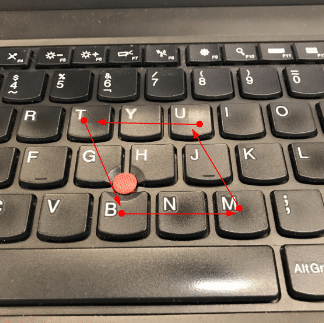
Another thing we can do is Learn us a pattern As we do with the unlocking of the mobile… for example, we ‘draw’ with the keyboard a 3×3 square starting in the letter ‘M’, so the base would be ‘MNB’, then we would go up the ‘GT’, the top part would be ‘YU’ and we would go down again by ‘JM’… you understand the idea? so our password could be ‘MnbgtyujM -1977’… and for another service we started with the N instead of the M, so the password would be totally different ‘NbvfrtyhN-1977’
But I have a lot of services and passwords to remember…
Some people use such passwords for all services by changing some things, for example ‘Seat €YPMC-1977-Facebook’, ‘Seat €YPMC-1977-GMail’, ‘Seat €YPMC-1977-Instagram’… but the bad thing about this is that If someone sees you type one of them Or you put it away on some common computer or something, the first thing you’re gonna do is try on other services, which is why you’re sold. How can we then remember 200 passwords we have for different services? No, putting the same safe password we just learned to generate is not good practice, so we need a password manager. M
if mother uses a notebook for this… that yes, Not bad as long as you don’t lose the notebook and no one has access to it. but it’s very uncomfortable to have to look for the notebook every time you want to access an application or service. I also have friends who use a password-protected document, it’s also a good idea as long as you have certain precautions so that you don’t miss or have access to it, but it’s uncomfortable to find it again, to open it (you must have a good password in turn) and copy the password to be able to access the service, so the best we can do if we have to manage so many passwords is to use a
Password Manager appropriate. Let’s see it in this other entry.
Carlos Sahuquillo
'Haga lo que haga en la vida, siempre compito' - Jacques Villeneuve Reserva una sesión →
Entradas relacionadas
Low-cost remote work
Lowcost remote work, Chernobyl, and the importance of not running security tests in a rush and under pressure.
Leer
Mounting a MESH network compatible with Apple HomeKit
You have problems with your wifi and you've thought about setting up a mesh network? The eero router solves this and is…
Leer
Automating shutters with Shelly 2.5 (updated 06/08/21)
Got motorized blinds but want to automate them? In this post, I'll explain how to use the Shelly 2.5 to get this…
Leer
1 comentario