How to tell if your kid is sneaking into your room without having a camera
 Carlos Sahuquillo
·
27 agosto, 2026
·
10 min de lectura
Carlos Sahuquillo
·
27 agosto, 2026
·
10 min de lectura

A few weeks ago I left my eldest son home alone for several days. He’s 19, and it’s not the first time he’s stayed home alone, but it was the first time he stayed several days while the rest of the family was in Valencia on holiday. As you can imagine, during those days my house was full of people every day and at all hours, with «Door open during the night» alerts going off all night long. Anyway.
Obviously I could already picture it, so the only thing I told him is that HE COULD NOT GO INTO MY ROOM, meaning the main bedroom. If some buddy or whoever stayed over to sleep, that was fine, but no going into my room.
The first thing that occurred to me was putting up a camera, but the bedroom is a delicate area for a camera… imagine that at some point in the future my wife gets mad at me and sells the intimate videos out of spite! I’d have my inbox full of women asking me to demonstrate my skills with them! What a mess.
Once the camera idea was ruled out, I thought about a door open/close sensor, but that wouldn’t really help me, since my bedroom door is usually open and the robot vacuum goes in and out whenever it needs to… so I thought about one of those Aqara vibration sensors on the bed, but that would only alert me if someone lay down on my bed… but what if they only came in to put on my dresses? So finally I decided to install a Motion Sensor.
And that’s exactly what I wanted to talk to you about today: the Aqara motion and light sensor, the P2 model, which is Matter, and the automations I’ve built to find out if someone goes into my room.
The sensor: Aqara Motion and Light Sensor P2
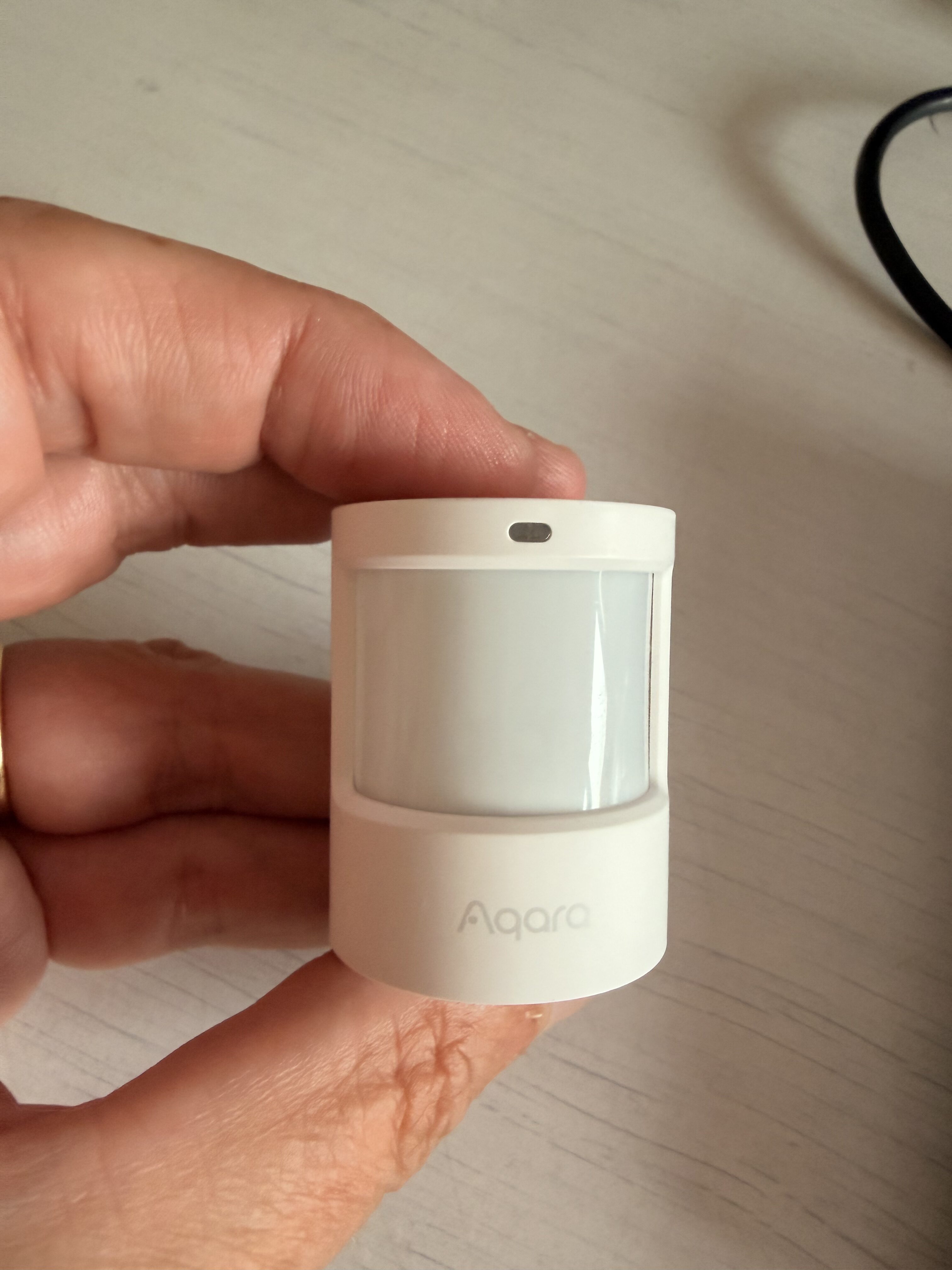
Aqara’s motion sensors are well known to everyone. I’ve been using them since time immemorial, back when they ran on ZigBee and I had the famous Aqara bridge that’s given us so many joys and so many headaches. The new thing about the P2 (besides having a funny name) is that it’s a Thread sensor compatible with Matter, so you don’t need the Aqara bridge and you can connect it to Home Assistant and HomeKit without one acting as a bridge for the other, which is exactly what interests me most in my house, as you know I spend my life going back and forth between the two.
So if you have a Thread Border Router at home (like an Apple TV 4K, a HomePod, the modern Echos, Eero, or Home Assistant with the right dongle) you pair it directly and off you go.
The P2 is cool because it’s not just a motion detector, it also has a light sensor (illuminance), it runs on a CR2450 coin cell battery, and you can fine-tune the settings quite a bit. I already talked about it a while back and recommended it in the episode the best Matter devices to expand your home automation network which is also on the blog, where I already told you that for about 30-something euros you get the sensor at home. I’ll leave the affiliate link in the podcast notes in case you want to grab one: https://amzn.to/3WFJk4L
Since it’s Matter, it allows what the standard calls multi-admin, meaning that the same device can be registered on several platforms at once. What you have to do is, from the platform where you already have it set up (in my case the Home app, since that’s where I paired it first, or the Aqara app itself), go to the device settings and request a new pairing code to share it with another ecosystem. With that code you go to Home Assistant, Settings > Devices > Add Matter device, paste it in… and within a few seconds you have it working in both places without having to do anything else.
This, which might seem like a small thing, is exactly the opposite of what I used to do before, which was integrating the gadgets into Home Assistant and then publishing them to HomeKit by tweaking the configuration file of the HomeKit bridge (you’ll recognize this if you read or listened to the episode about the Tedee lock compatible with Matter). But with Matter sensors you skip all that, and if one of the platforms ever goes down, it keeps working fine on the other.
The automations I’ve set up
Well, after that you just have to hide it a little bit in the room. I’m not going to tell you where I put it in case my son listens to the podcast at some point, but it’s not too visible. And I’ll tell you what automations I’ve made in case any of them give you similar ideas. Keep in mind that a motion sensor doesn’t know who’s coming in, so you have to give it context and add conditions, which is what automations are all about in the end.
1. Absent guardian (automatic, no need to touch anything)
The first one is called «absent guardian» and what it does is: if my phone and my wife’s aren’t home and the vacuum hasn’t been launched, but the sensor detects movement in the bedroom, I get an alert on my iPhone saying something like «👀 movement in your room and you’re not home.» This is automatic and I don’t have to turn anything on: if we’re out and the room should be empty, any movement is suspicious… but you have to account for the robot vacuum.
2. Surveillance mode (on demand, when I am home)
The second one is surveillance mode. When I’m home but not in the bedroom (because I’m working, in the living room, or whatever) I’ve set up a «Bedroom Surveillance» switch. When I turn it on, the system ignores motion for 20 seconds (enough time for me to leave the room without triggering it myself), and after that, if someone comes in, I get a discreet alert with a button to disarm it right from the notification. It also has anti-spam so it doesn’t bombard me, and an auto-disarm after 2 hours in case I forget to turn it off, since I know myself and I’m quite capable of walking in and freaking myself out.
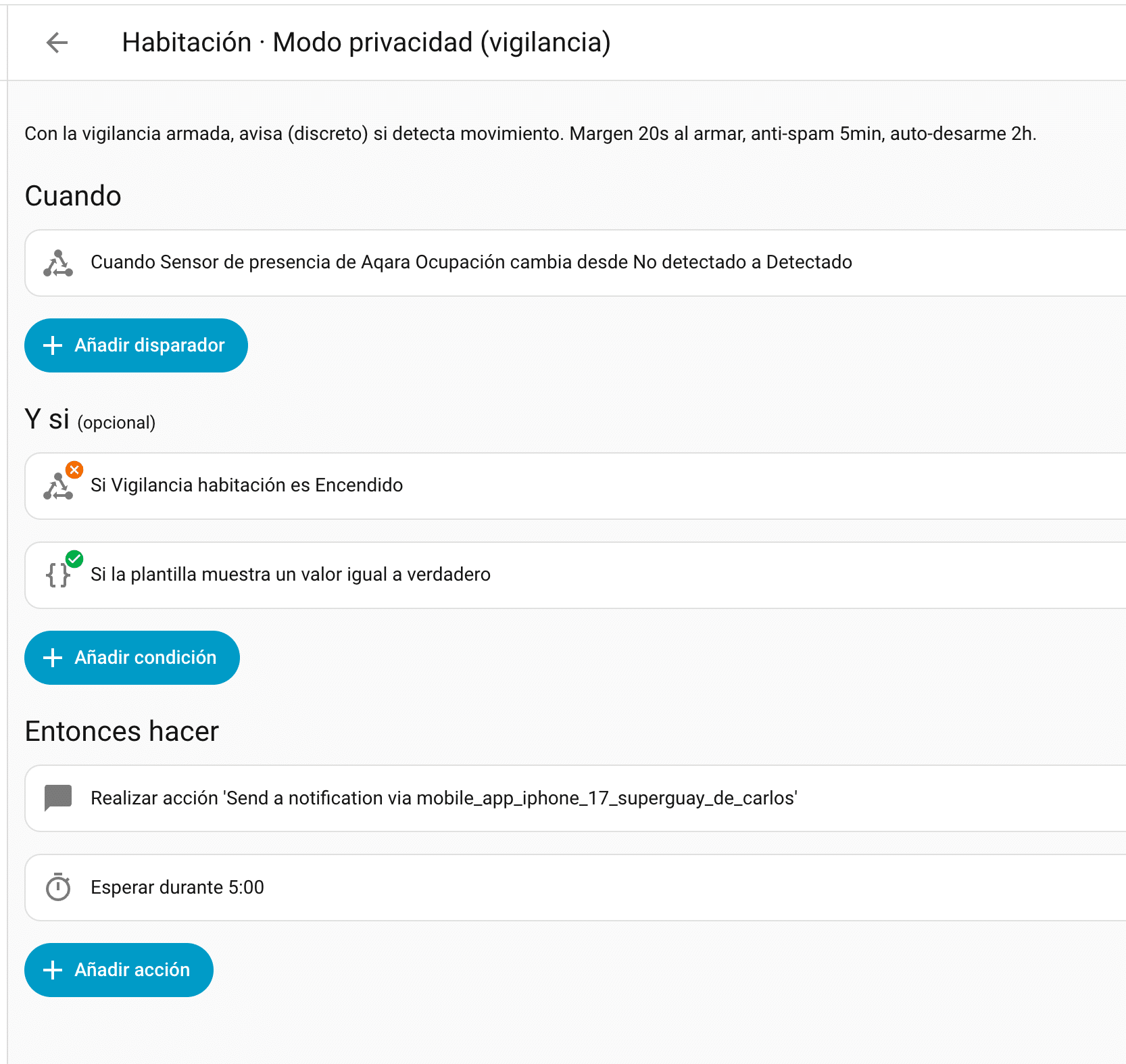
The discreet alert thing is on purpose: I’d rather catch them without them knowing than put on a whole show with flashing lights and a WAAAH WAAAH siren blaring! Although I do have that option ready in case I ever feel like going full dramatic mode, in the style of the They Don’t Notice vibe I told you about in the episode about my kids never notice when someone rings the doorbell. I’ll put all the links in the podcast notes.
3. Low battery alert
Since the P2 runs on a coin cell battery and these sensors die suddenly without warning, I’ve set up a notification when the battery drops below 15%. If you’re a purebred HomeKit user, you already know the Home app is a disaster for this and only warns you when the device has five minutes of life left; the way to go is to use Controller for HomeKit or Home Assistant, just like I told you in the post about low battery notifications. Nothing new under the sun, but it’s one of those things you’re grateful to have set up the day it warns you it’s running low, although I’ll tell you, the battery lasts forever.
4. And the cherry on top: controlling it with Siri
The «Bedroom Surveillance» switch lives in Home Assistant, but I’ve published it to HomeKit through the bridge, so now it shows up in the Home app as just another switch and I can say «Hey Siri, turn on Bedroom Surveillance.» In other words: the sensor comes in via Matter to both places, and the automation switch goes out from Home Assistant and back into HomeKit. Controller for HomeKit also allows virtual switches and complex flows that are really cool, but I’ll tell you all about that another day in more depth.
What could be done with this
With a sensor that also measures light, ideas come to mind that follow the same line as the automations I usually build, which I’ll keep testing:
- Nighttime courtesy light: taking advantage of the illuminance sensor, so that when there’s movement at night and the room is dark (below X lux) the bedside lamp turns on at 5% and turns itself off after a couple of minutes with no movement. This could be handy when I get up to go running and fumble around in the dark or light my way with my phone so as not to wake my wife, but it needs careful tuning so it doesn’t turn on in the middle of the night or during one of those marathon sex sessions we all have with our partners, of course.
- Notification on the TV too: since my LG TV has a notification service compatible with Home Assistant, I could show the alert in the corner of the screen, just like I already do with the doorbell.
- Arm surveillance mode automatically: instead of remembering to turn it on, have it arm itself automatically once the room has been empty for a while and it’s within a specific time window.
- Fine-tune by presence: cross-reference the sensor with who’s home to decide who to notify and when, which is exactly what minimizing notifications was all about, because an automation that floods you with alerts ends up in the trash.
Conclusion
So there you have it, for not much money I’ve set up a notification system for when someone enters my bedroom using the Aqara P2 sensor with Matter, and beyond the gadget itself, what I loved was remembering how well HomeKit and Home Assistant get along when Matter does what it’s supposed to do, with the same sensor in both places, with multi-admin, without losing any features, and with the ability to mix the best of each platform into a single automation—although Apple’s Home app notifications are a bit meh, so I built these in Home Assistant, but I could have just as easily built them in Controller for HomeKit.
As a spoiler I’ll tell you I’ve gotten a gazillion notifications these past few days… the little bastards plugged a PlayStation into the TV in my bedroom and played sprawled out on my bed. Or so I’ve been told. Anyway.
¿Necesitas ayuda con tu domótica?
Te ahorro tiempo, dinero y disgustos. Sesiones de consultoría desde 60€.
Carlos Sahuquillo
'Haga lo que haga en la vida, siempre compito' - Jacques Villeneuve Reserva una sesión →
Entradas relacionadas

How to re-pair Zigbee sensors in Home Assistant without losing your automations
Swapping the battery wasn't enough to bring four Aqara sensors back to life. Here's how I re-paired them with ZHA without losing…

How to spot issues in a Matter device
I opened Home Assistant's new Matter and Thread map to check which routes my devices are using and see just how useful…

HomeKit with AI in iOS 27
Apple released iOS 27 on September 14th and, as it does every year, I'm going through what's changed in the Home app…
Buenos días ¿Qué frecuencia de actualización de lux tiene este sensor?
Gracias de antemano por la respuesta.