Some of my automations in HomeKit
 Carlos Sahuquillo
·
11 enero, 2024
·
13 min de lectura
Carlos Sahuquillo
·
11 enero, 2024
·
13 min de lectura
Ep. 63 · escúchalo
0:00 /
Idioma:CastellanoEnglish
I wanted to save this post for a future private section of the website where only premium subscribers could get in, a sort of Patreon or Ko-Fi thing to see if I could get rich off home automation… but since that doesn’t seem to be happening, I’ve decided to tell you about some of my automations in HomeKit. The HomeKit tag is because all of them are created from the Home app and from Shortcuts, with no third-party apps, but in reality they’re automations I also use in Home Assistant whenever Apple pisses me off! At that point, I disable all the automations from the Home app and cling to Home Assistant for dear life, thinking it’s my new shepherd… but then my fanboy side kicks back in, I go back to HomeKit and disable all the Home Assistant automations so that only the ones I have in HomeKit run. Basically they’re the same in both environments.
I also hadn’t talked about this before because it’s very easy to ‘get carried away’ and end up tangled in automations that don’t actually solve any real problem you have. I’m sure some idea will stick with you or you’ll find some of the automations I mention interesting… but think about whether it actually solves something for you. I hope you find all of them useful or think they add value and make life easier, but if they’re not automations you truly need, you’ll see how they end up falling out of use and you’ll be left with just the basics. To give you an example I’ve already mentioned before, a while back I had an automation that turned the bathroom lights blue when I got up to shower if it was going to rain that day… sounds useful, right? Well, it’s as silly as they come. If it’s going to rain that day, you already found out days earlier through the thousand weather inputs we have: the phone app, the smartwatch, your neighbor’s comment in the elevator, or that knee they operated on that aches when rain’s coming… it rarely catches us by surprise.
Not to mention the guy who had his Hue bridge connected to IFTTT so it would turn his home lights Barça blue-and-red whenever Barça scored a goal… well, the fellow complained that IFTTT notified him too late and he’d hear the neighbor celebrating the goal before his lights even changed, so he went looking for a similar service with less lag. Super useful.
I’ve decided I’m going to put together another installment for you with some of my HomeKit notifications, sort of a part two, so this time let’s focus only on Automations and Scenes created from the Home app and from Shortcuts, no Controller for HomeKit or anything like that.
Alright, let’s get into it.
Ambiences and Scenes
Keep in mind that I really like using ambiences or scenes. I find it more useful than creating an automation with everything that needs to happen, especially if it can be reused or triggered manually. This needs a bit of thought, because you could have an automation that turns off all the lights at 11:30 PM… but you might actually want it as an Ambience so you can run it anytime from your phone or by asking Siri. Plus, it’s much easier to add new accessories to an Ambience: if you have that automation to turn off all the lights and tomorrow you buy a new bulb, you have to go into the automation and add the accessory. If the automation simply triggers the Scene, you just have to edit the scene to add the new bulb, saving yourself a bunch of clicks. If you end up creating an ambience or scene, you also need to think carefully about the name, because at some point you might ask Siri for it. Saying ‘Hey Lola, run Kids Lights and Music ON’ is not the same as saying ‘Hey Lola, wake up the kids’ to trigger an Ambience called ‘Wake up the kids’ that turns on the lights and plays music through the HomePods. The other day, during a Home Automation Consultation with Luis, a guy from the Telegram group who’s quite the rascal, he told me he has an Ambience called Make Me Fall in Love that turns the lights red and switches on the smart plug for the record player (yes, record player) where he’s got an Eros Ramazzotti album loaded… And of course, to run it he just has to say ‘Hey Lola, make me fall in love!’. Luis, if you’re reading this, I recommend adding the Nuki lock to that Ambience so it locks the door, so you don’t end up like that time we were talking and your mom showed up at the house. Other times, the automation calls a Shortcut instead. As you know, when we’re choosing devices within an Automation, we can scroll all the way down and tap Convert to Shortcut to add conditions, variables, or whatever we need. Which is really handy for setting up conditions. You can’t add conditions to an Ambience because it can’t be converted into a Shortcut. Keep in mind that Siri is smarter now than before. Before, if you said ‘Hey Lola, turn on the living room’, it would turn on every device you had in the living room, even a smart plug or the air conditioner. It simply switched everything ON. Now, if you say ‘Hey Lola, turn off the living room’, it knows it should turn off the lights, leaving the rest of the devices untouched. You can also say ‘Hey Lola, turn off the living room lights’, of course… but the other way saves you 2 words! And that’s breath you can save for other things.Some Automations
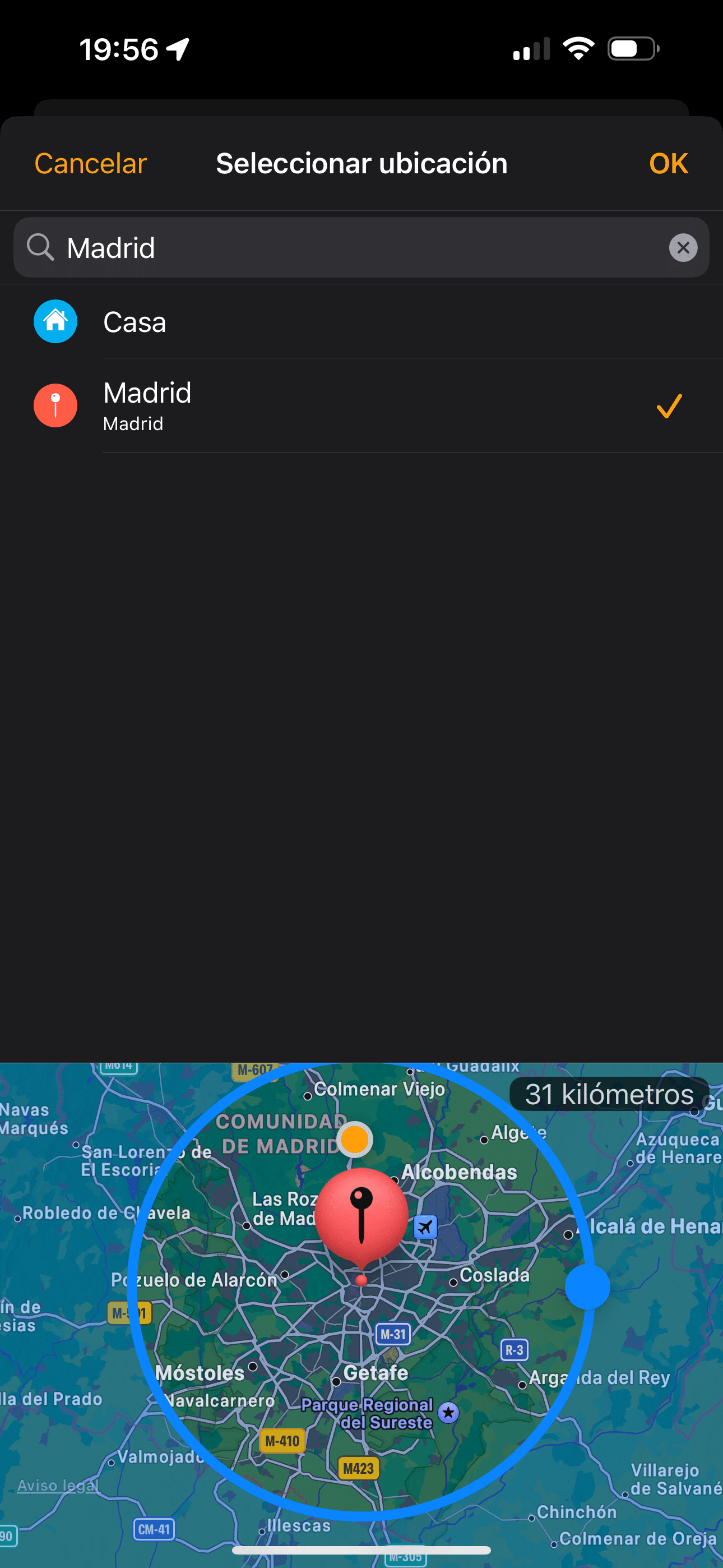
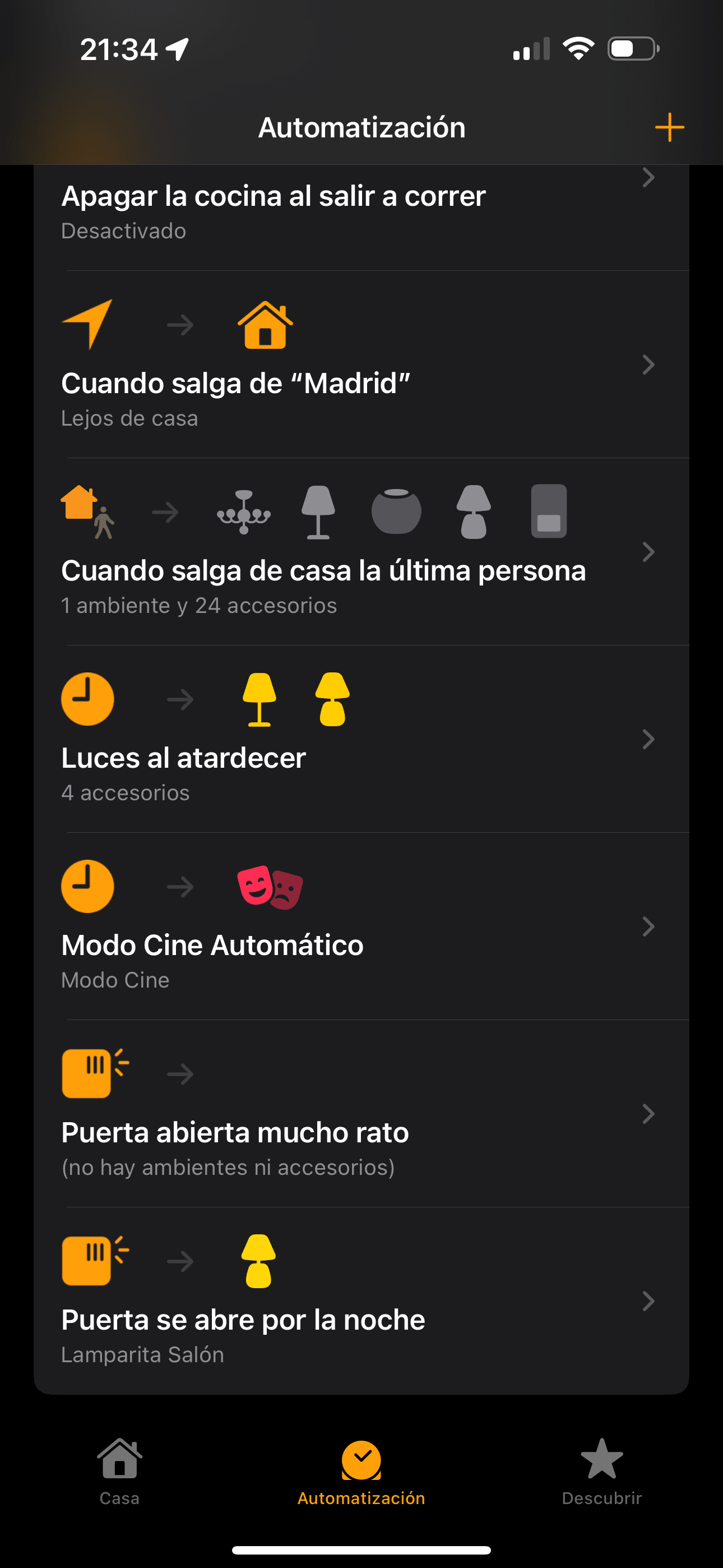
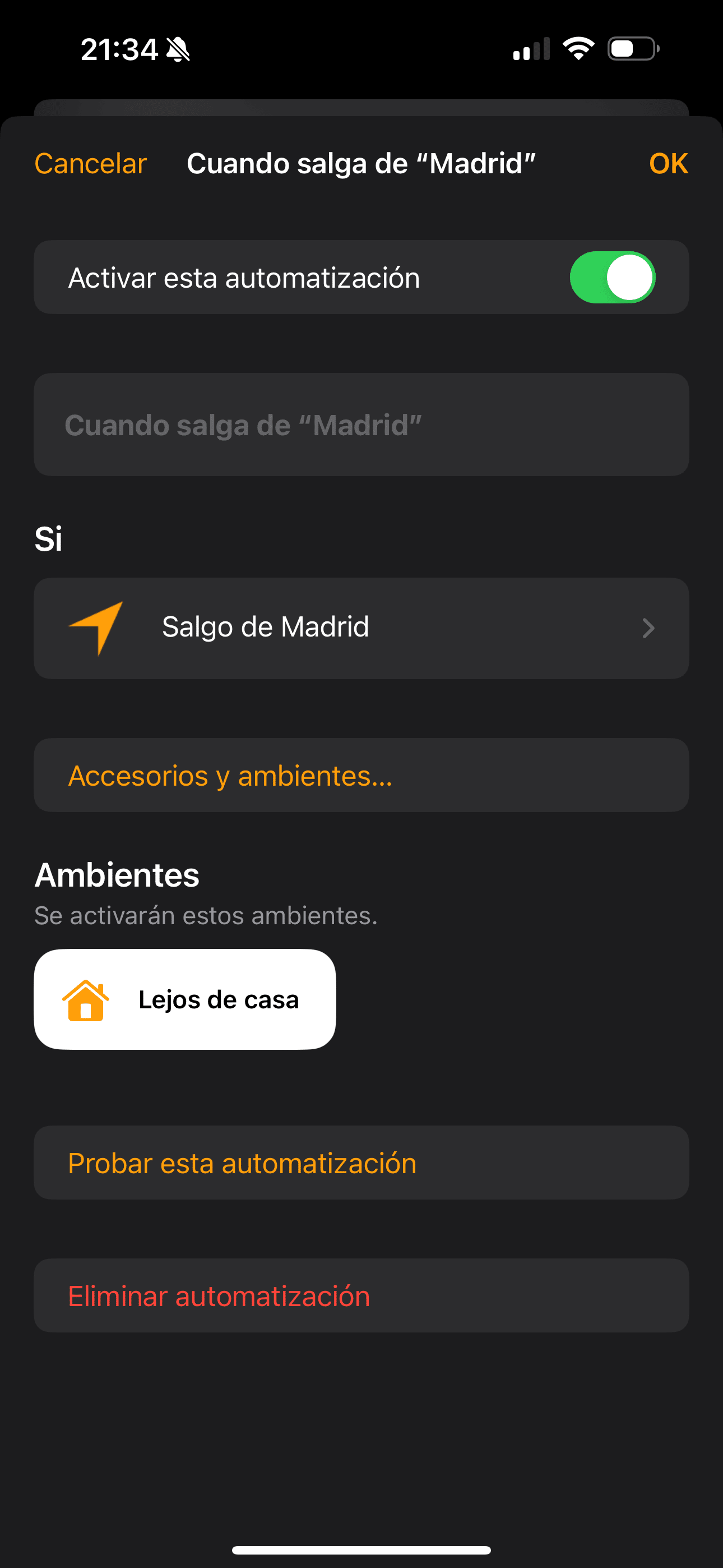
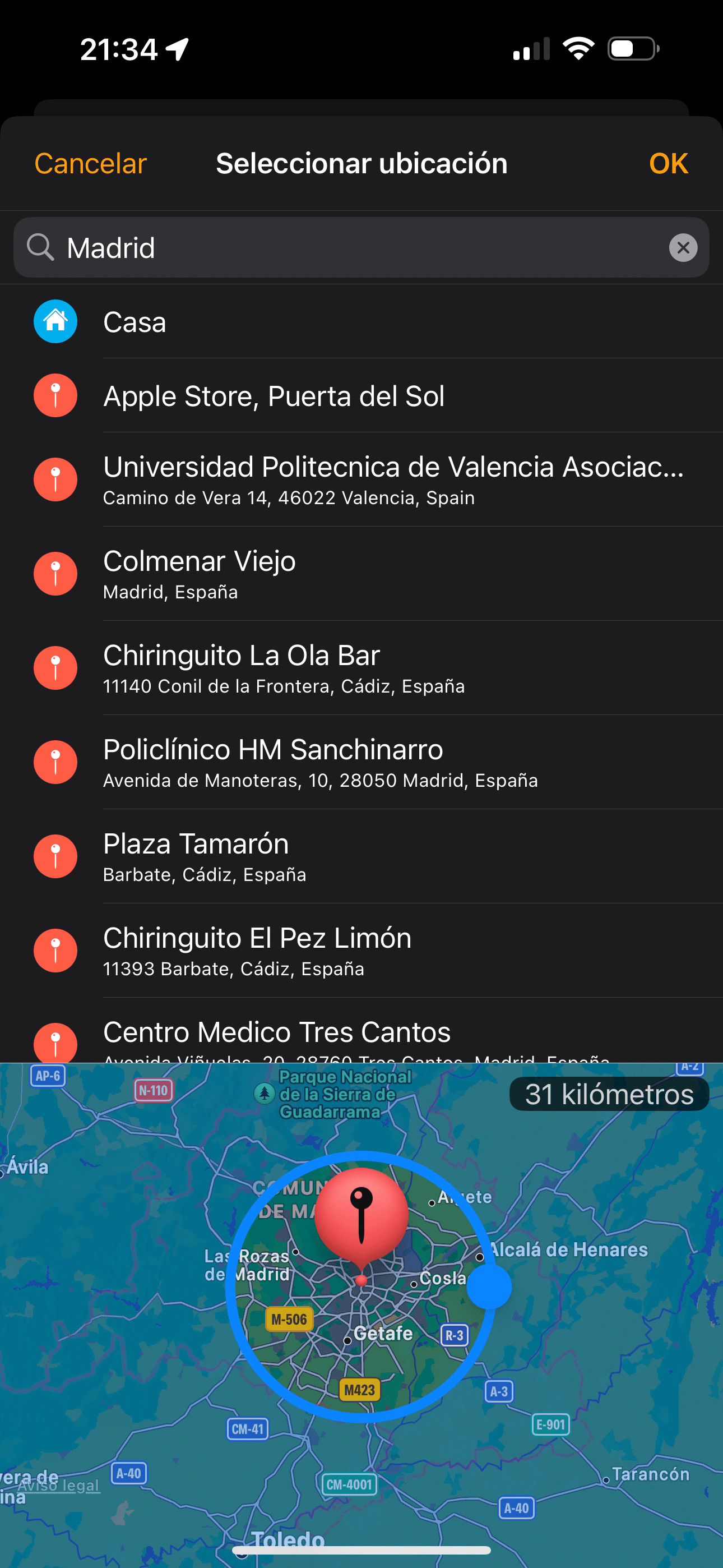
One of the automations you all ask me about most is the one I sometimes mention: ‘and when we leave the Community of Madrid, the boiler turns off’. The most typical question is how you define «the Community of Madrid.» If you go to the Home app and create a new automation of the ‘When leaving’ type, by default the Location field shows Home. But if you tap on that, you can change it from Home to, say, Madrid, and then Madrid shows up with the classic little circle so you can widen the radius. In my case, that radius is 31 kilometers to cover the whole city of Madrid and its surroundings, so that when we step outside the circle, the ‘Away from home’ ambience runs: the boiler shuts off completely, any lights left on turn off, and the door locks itself. This automation can be tweaked to turn on a light to simulate presence, but I actually don’t do that with the ‘Away from home’ automation, since I only use that one if we’re going to be out for the day or something like that… but I have another ambience called ‘We’re on vacation’ that runs not when we leave home via the ‘When leaving’ automation, but with an ‘On arrival’ automation in Valencia, where, as I’ve mentioned before, I have a summer apartment. Also, in the Home app I have other automations for that apartment, so that when I arrive in Valencia, the electric water heater turns on and, if it’s cold, a couple of heaters in the apartment switch on too. Needless to say, if it’s summer and the temperature isn’t low, only the water heater turns on.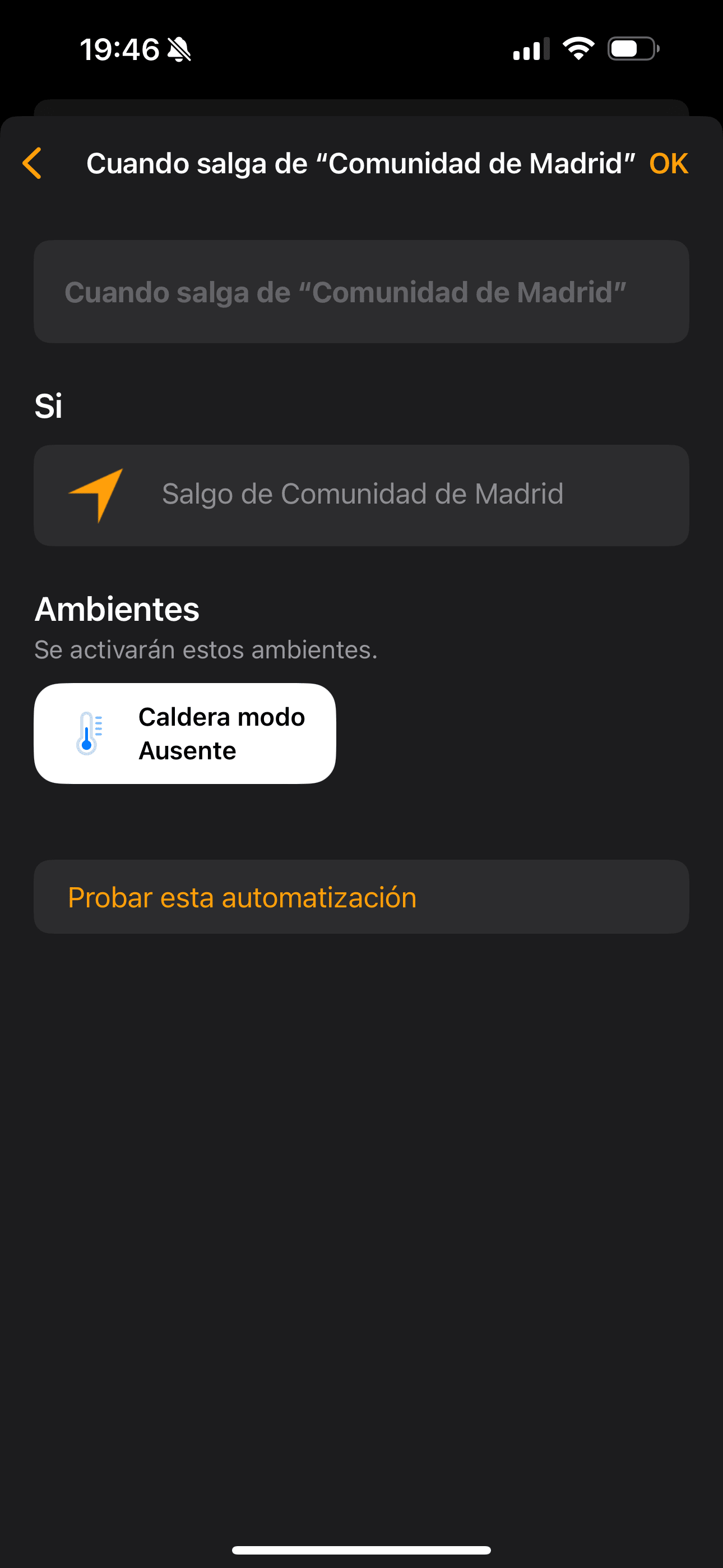
Personal Automations
Oh, I also have one of those Personal Shortcuts that might interest you. As you know, Personal shortcuts run from our own device, not from the Home Hub, but that lets us automate actions that we can’t do from the Home app. For example, I have a personal automation so that when my phone starts charging at night, the living room light turns off, it waits 4 minutes, then turns off my bedside lamp, since that means I’m heading to bed. But this automation has 2 chained IF conditions, so that if the living room TV is on (it’s an LG that’s HomeKit-compatible) or the Apple TV in the living room is on, that means I’ve gone to bed but someone else is still watching TV, in which case the living room lamp doesn’t turn off. Anyway, I hope I’ve given you some ideas. As you can see, the most important thing for me is being able to combine automations with Ambiences whenever they might need to be triggered outside the usual schedule for whatever reason, and making sure every automation includes conditions, because even though it might seem like we lead pretty structured lives and do the same thing every day, once you set up strict time-based automations you’ll realize that every day is the same, but some days are more the same than others.¿Necesitas ayuda con tu domótica?
Te ahorro tiempo, dinero y disgustos. Sesiones de consultoría desde 60€.
Carlos Sahuquillo
'Haga lo que haga en la vida, siempre compito' - Jacques Villeneuve Reserva una sesión →
Sigue leyendo
Ver todo el blog
Entradas relacionadas

17 septiembre, 2026 · Domótica
Leer
HomeKit with AI in iOS 27
Apple released iOS 27 on September 14th and, as every year, I'm going through what's changing in the Home app and HomeKit.…
Ep. 112 · escúchalo
0:00 / 12:44

3 septiembre, 2026 · Domótica
Leer
Webhooks and workflows in Controller for HomeKit
Kicking off Season 4. I'm picking back up the automation for the sensor that kept running out of batteries that I told…
Ep. 111 · escúchalo
0:00 / 13:12
27 agosto, 2026 · Domótica
Leer
How to tell if your kid is sneaking into your room without having a camera
I bought the Aqara P2 presence and light sensor with Matter, and I've got it running simultaneously on HomeKit and Home Assistant…
Ep. 110 · escúchalo
0:00 / 12:16
Hola Carlos, es muy interesante e ilustrativo tu articulo
Tengo una pregunta, ¿como es la automatización que ejecutas para «apagar el calefactor del cuarto de baño pequeño (el de los niños) a los 15 minutos de haberse encendido porque muchas veces han salido del baño y se lo han dejado encendido… y la misma automatización lo apaga si se apaga la luz por el mismo motivo».
Yo tengo el mismo problema pero no consigo hacer una que funcione bien.
Gracias por la ayuda.
Hola JMS! Muchas gracias 🙂
Es sencillo, puedes hacerlo de varias formas:
– Una automatización sencilla ‘Al controlar un accesorio’ a la que le dices ‘Cuando el calefactor se enciende’, la conviertes en Atajo y entonces metes un ESPERAR X (Ese X son segundos) y después Ajustar Calefactor para que se apague.
– Otra automatización sencilla ‘Al controlar un accesorio’ a la que le dices ‘Si Luz baño se apaga’, apaga el calefactor. Para esta no te hace falta ni atajo a priori, aunque le podrías poner una condición SI EL CALEFACTOR ESTÁ ENCENDIDO para que cuando se apague la luz no lo intente apagar si ya lo está.
O bien puedes meterlo todo en una sola automatización como la primera pero ya no puedes decirle ESPERAR 600, sino que tienes que meter, por varios condicionales. Imagina que quieres que se apague a los 10 minutos, 600 segundos, pues puedes crear una automatización que sea ‘Al controlar un accesorio’ a la que le dices ‘Cuando el calefactor se enciende’, la conviertes en Atajo y entonces metes un ESPERAR 100 segundos y después un SI la luz está encendida, entonces ESPERAR 100… sino, apaga el calefactor. En la Condición satisfecha, ese esperar 100… lo mismo, le metes un SI la luz está encendida, ESPERAR 100, sino apaga el calefactor. Así hasta 4 veces más para tener en total los 600 segundos de espera.
También te puedes liar aún más, podemos poner un enchufe con medidor de consumo, observar el consumo del calefactor y tenerlo en cuenta con el SI de manera que si alguien desenchufa el calefactor y pone un secador de pelo o el móvil a cargar, que no se le apague cada pocos minutos… o que si la temperatura de la casa es mayor de 22 grados que se apague el calefactor inmediatamente… no sé, el límite está en la imaginación y lo que te quieras liar, pero si no te quieres liar mucho, con el primer ejemplo y las 2 automatizaciones tienes más que suficiente 😀
Que bueno Carlos!!!!
Muchas gracia, funciona fenomenal. Habrás notado que soy novel en esto y toda ayuda es muy bienvenida.
Gracias de verdad, así se apagará el radiador del baño cuando entren las niñas a la ducha. (Que siempre se les olvida)
Un fuerte abrazo!
Jajajaja, me alegro!! Muchas de nadas!!!
Yo con HomeKit he de reconocer que estoy muy verde en automatizaciones.
Tengo una automatización que supongo que por nuevo no doy con la tecla.
Tengo una evecam que habitualmente se enciende por la noche si detecta que sales o entras. Ahora integre un ventilador con luz cecotec y tengo una luz para cuando cenamos fuera. El tema es que quiero hacer que la luz de la cámara se encienda por la noche solo si la otra luz NO está encendida.
Con HA puedo lanzarle un sensor, pero en HK no se como poner un condicional con dos sensores o como hacer para que no encienda la luz de la cámara
Es torpeza Mila o con hk no se puede hacer?
Hola Juan! No debería ser muy complicado, no? Yo lo haría con una Automatización ‘Cuando un sensor detecta algo’, le pones la cámara, le dices ‘Cuando detecte’ y luego, en lugar de darle directamente el ventilador o la luz, iría abajo del todo a ‘Convertir en atajo’ y haría un Atajo condicionado tal que así: Si ‘la otra luz’ está desactivado, Ajustar Luz cámara. Si no, Terminar sí. Te pongo un screenshot, en mi caso ‘Lamparita Salón’ es tu ‘otra luz’, el SI comprueba si está apagada y, en caso de estarlo, Ajustar ‘Consola Salón’ que en tu caso es la luz de la cámara. Si no, pues aquí acaba la historia, si la otra luz ya está encendida no necesitas encender nada. A ver si te sirve 🙂
Hola! Te traigo esta automatización que encontré y para mi es la más top para ahorrar en luz si tienes discriminación horaria y domotica o vehículo eléctrico en casa, te dejo el link:
https://www.precioluz.app/atajos.html
La tengo puesta para que active la corriente para cargar el coche electrico si el precio de la luz es menor a X y que corte la corriente si el precio es mayor que X
Es muy recomendable si tienes tarifa con discriminación horaria, el ahorro es una locura!
Saludos
Gracias Carlos. Conoces alguna manera de que se active una automatización en una hora relativa, por ejemplo, una hora después de la puesta de sol? En atajos puedes obtener la hora de puesta de sol, etc., y sumarle una hora para que el atajo active, por ejemplo, la bajada de persianas 1 hora después, cuando ya prácticamente no hay luz. Pero, ¿cómo incluir esto en una automatización?
Hola Agustín! Lo puedes hacer directamente en la app Casa como una Automatización y también desde Controller for Homekit… y es muy fácil, no tienes que inventar nada, mira:
Desde la app Casa, vas a Automatizaciones y creas la de ‘En un momento del día’. Aquí le dices ‘Puesta de Sol’. Pero si te fijas, al lado de ‘Puesta de Sol’ hay una i para más información:
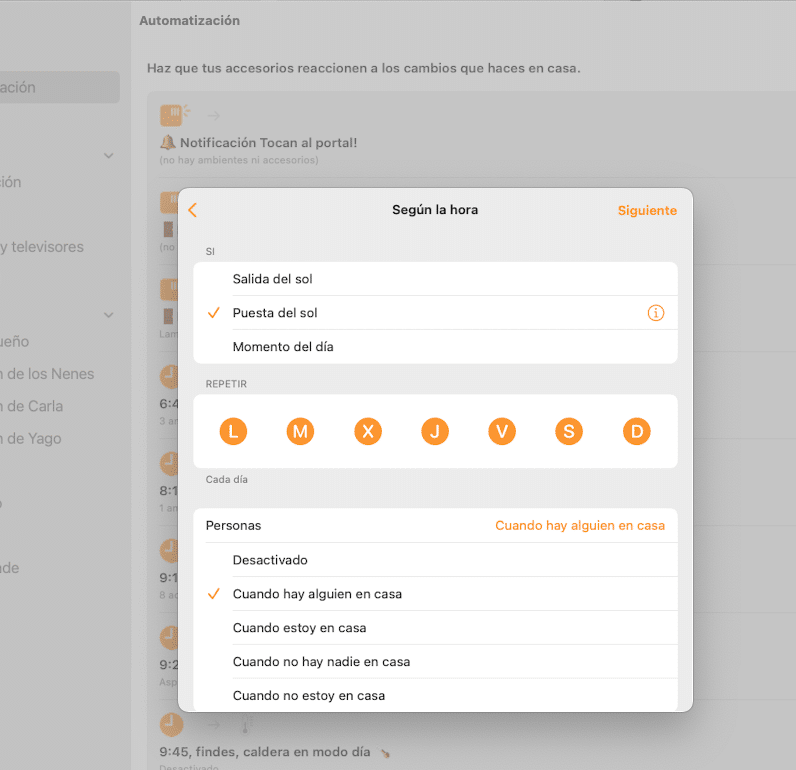
Si presionas la i puedes decirle que se active unos minutos antes de la puesta de Sol o, lo que tú buscas, unos minutos después de la puesta de sol:
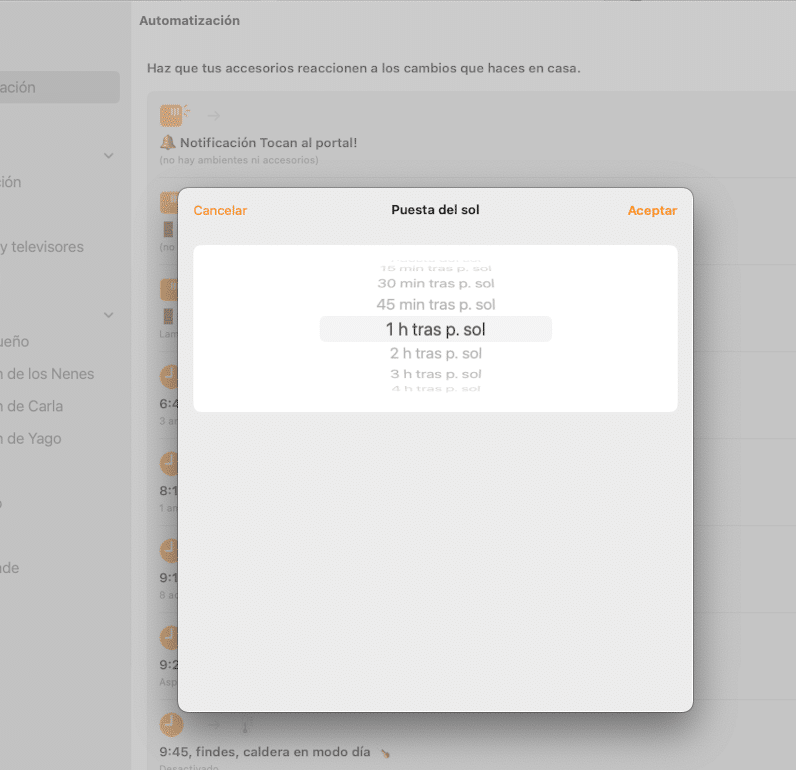
Desde Controller for HomeKit también lo puedes hacer igual de sencillo:
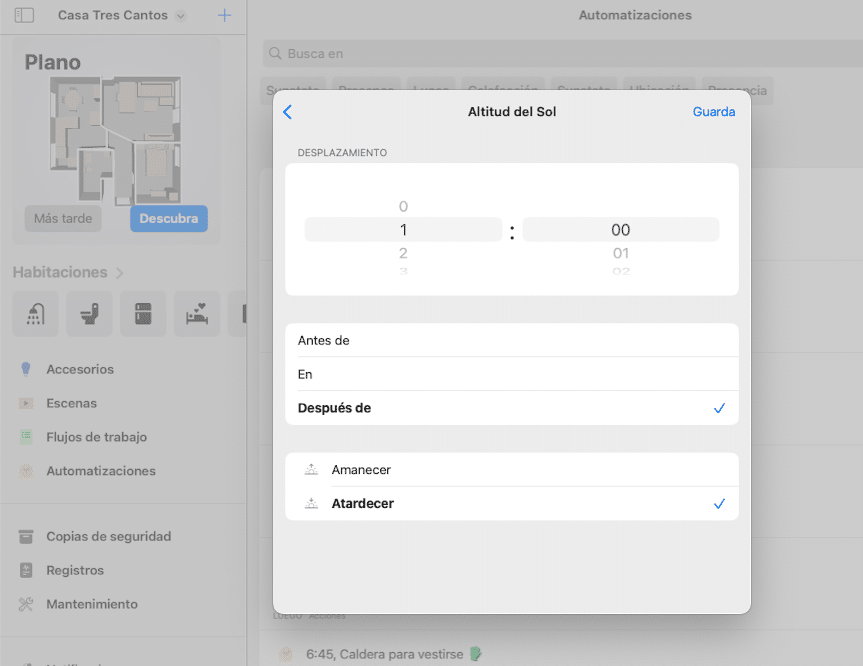
Hola,
Estoy encantada con todas las explicaciones, pero hay algo que no encuentro y me tiene un pelin fastidiada porque con con Google HOME es muy fácil de hacer y yo soy Apple total. ¿Cómo consigo que, en una automatización o en una escena, Siri diga lo que yo quiero que diga? Por ejemplo, cuando le digo “buenos días”, enciende la luz y pone determinada música, pero yo quiero que me conteste “buenos días” y que me diga la temperatura que hace y la hora que es. ¿Cómo se hace? Gracias por la ayuda.
Hola. He aprendido muchísimo con tus explicaciones. A ver si puedes aclararme algo que mw tiene muy frustrada: ¿cómo se consigue que Siri conteste lo que tú quieras en una automatización o escena? Si yo digo “buenos días” quiero que se encienda la luz y que Siri me diga “buenos días Chelo, son las tal hora y la temperatura es de X grados”. No encuentro la manera de hacerlo.