What is two-factor authentication
 Carlos Sahuquillo
·
27 julio, 2017
·
6 min de lectura
Carlos Sahuquillo
·
27 julio, 2017
·
6 min de lectura

According to Google, passwords are dead and we need to find other ways to access services. We’ve talked in previous posts about how to create a good password and how to store and remember all those passwords once generated, which works great for most users… but sometimes we hear that some service we’re signed up for has been hacked and that the bad guys managed to access the user database… so what happens then? Could they have accessed my account? Well, it depends. Usually, user passwords are stored encrypted in the database and can only be obtained through brute force, so if we have a strong password, they won’t be able to access our account… but other times our password has ended up exposed, which means that without doing anything wrong, we’re left with our pants down despite having put a lot of effort into generating our password, never sharing it with anyone, and guarding it as carefully as we guard our house keys… damn hackers.
On the other hand, it can happen that we have a beautiful password, meeting all the security requirements we discussed a few days ago, but that we use a computer that has some virus or trojan (I’ll talk about trojans another time, noted) specialized in stealing passwords. In this case, it won’t matter whether our password is secure or whether it’s stored super-encrypted in the service’s database… the trojan or virus will capture it as we type it on the keyboard, before it’s sent to the service to be encrypted and stored in the database.
Looks like the bad guys have it all figured out, huh? I check the little padlock in the URL to make sure it’s secure, I make sure I’m browsing through HTTPS, I racked my brain generating a secure password… and now it turns out I connected from a friend’s computer (or from a hotel computer to print my plane tickets) that had no updates or antivirus, and they stole my password. Seriously, you can’t trust anyone!
2FA: Two-factor authentication
The two-factor authentication comes to solve that problem. Basically, to access a service that supports it, we’re going to need a password and a random number generated by our phone. Sounds complicated, right? Two things to remember! No, don’t worry, let’s see exactly what this new security feature does.
When we sign up for a service that supports 2FA, the service gets linked to an app we install on our phone to manage 2FA access. Every time we want to log in from an unusual location (no, it doesn’t ask every time), we have to open the app on our phone and enter the number it has generated at that moment, which is usually 6 digits and lasts for a set amount of time. This way the service knows it’s really us (we have our phone, not just the password) and that it’s a legitimate connection. Here’s a picture from my phone, for example:
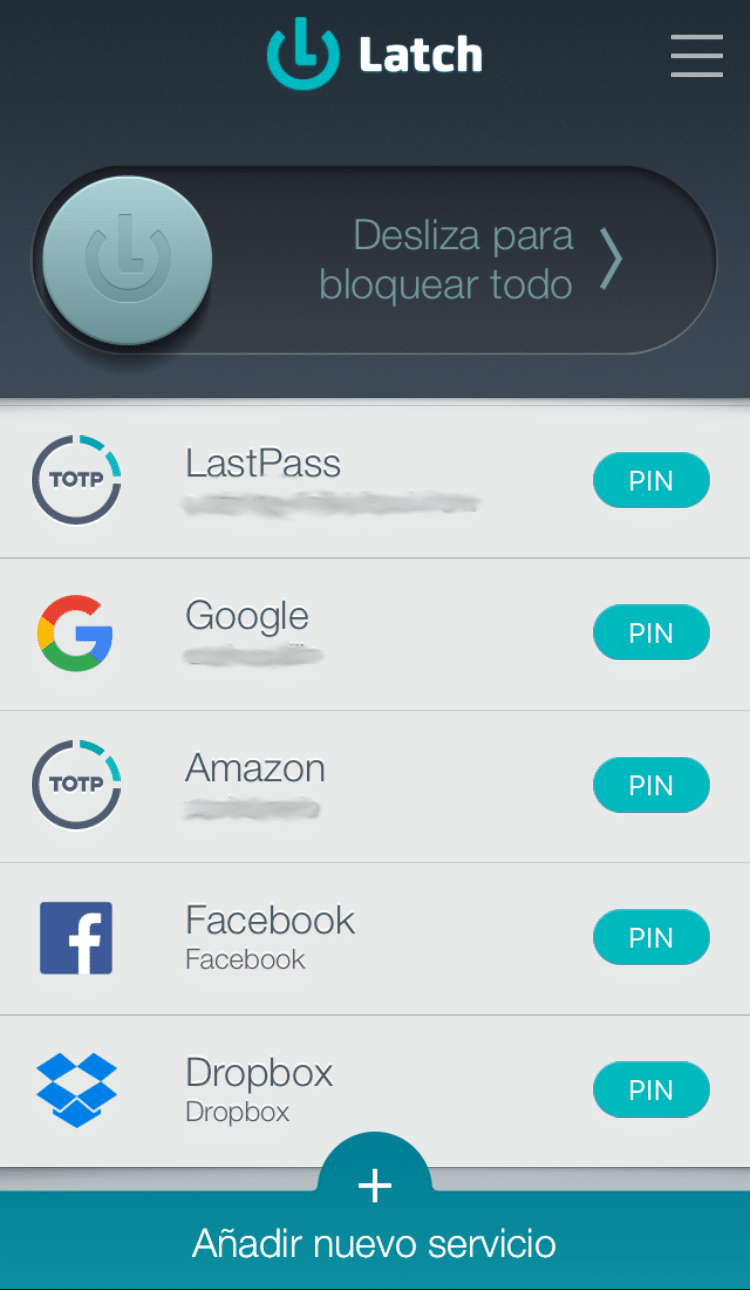
When I want to log into one of these services, in addition to typing my password, the system asks me for the number my phone has generated at that moment:

The good thing is that this feature is highly configurable, you can, for example, set Facebook to only ask for the number when you connect from a computer or phone that isn’t your usual one, or from an unusual country that’s not the usual one. Only in that case will you need to type in the number.
Which services support 2FA?
Little by little, new services are adding support for 2FA, but we can already find it available in the most common ones. Not all of them offer the option to ‘centralize’ the PIN in an app; some simply send it via SMS to your phone (and in the process, they get hold of your phone number, so they know FOR SURE that you’re a loyal user of the network). In other words, you can use 2FA on Google (https://www.google.com/landing/2step/), on Dropbox (https://www.dropbox.com/help/security/enable-two-step-verification), on Amazon (https://www.amazon.com/gp/help/customer/display.html?nodeId=201962420), of course on LastPass as we already mentioned (https://helpdesk.lastpass.com/multifactor-authentication-options/), on Microsoft (https://support.microsoft.com/es-es/help/12408/microsoft-account-about-two-step-verification), on Facebook (https://www.facebook.com/help/148233965247823), on Twitter (https://support.twitter.com/articles/20170388#), on Instagram (https://www.turnon2fa.com/tutorials/turn-2fa-instagram/)… and on lots of other services, I even use it on services like GitHub (https://help.github.com/articles/providing-your-2fa-authentication-code/).
Alright, you’ve convinced me, what do I need to install on my phone?
There are several apps capable of identifying services and generating the number, the most common one is probably Google Authenticator (available for iOS and for Android). Personally, I use Latch from the folks at ElevenPaths because it gives me a bit more flexibility and because I already had other services integrated with Latch, so having everything in the same app is very convenient for me. That said, if you want to start from scratch, the easiest thing is to check out Google’s guide and follow the steps to make your GMail account a bit more secure. Once you’ve got the first one set up, you’ll start thinking of other services to protect, and I’m sure you’ll get the itch to double-factor-authenticate all your services.
Go on, give it a try, it’s very easy to do and it exponentially boosts the security of our account. Nobody would be able to access that protected service, not even if they had our password!
Carlos Sahuquillo
'Haga lo que haga en la vida, siempre compito' - Jacques Villeneuve Reserva una sesión →
Entradas relacionadas

Low-cost remote work
Lowcost remote work, Chernobyl, and the importance of not running security tests in a rush and under pressure.
Leer
Mounting a MESH network compatible with Apple HomeKit
You have problems with your wifi and you've thought about setting up a mesh network? The eero router solves this and is…
Leer
Shelly for shutters: the 2.5 guide, HomeKit, and Matter (2026)
Got motorized blinds but want to automate them? In this post I explain how to use the Shelly 2.5 to get this…
Leer
1 comentario