Excessive light consumption alerts
 Carlos Sahuquillo
·
5 septiembre, 2024
·
8 min de lectura
Carlos Sahuquillo
·
5 septiembre, 2024
·
8 min de lectura

A couple of years ago I told you how I had installed a Shelly EM to measure the electrical consumption of my house. First I tried to collect the real-time consumables of the service it offers. DATORIS where it shows you the supplier’s data, but that connection I failed a lot., so finally I bought a Shelly EM with p
amperiometric inza to measure consumption in real time. I talked about it too. this podcast episode,
The point is, With the Shelly EM I can see in real time the consumption of 2 circuits since I have 2 amperiometric tweezers, one connected to the entrance of the house and another connected to the magnetothermal or circuit of the kitchen, which is where the most consumption is usually taken. This way, I can see if at home we’re eating for example 2 kW and of that 1.8 is from the kitchen., so the other 0.2 come from the rest of the house.

–
And not just that. As I told you at the blog post I was telling you before, I can see accumulated consumption of the month, consumption peaks and if I put the price of the KW / time of the contract you have, you can know more or less how much I will pay in the next receipt, all very cool… even though you know what I always say about all these graphics, you look at them during the first few days, you see that they’re working, they’re full of data and colors… and you don’t listen to them anymore. Until something fails, of course, what happened to me.
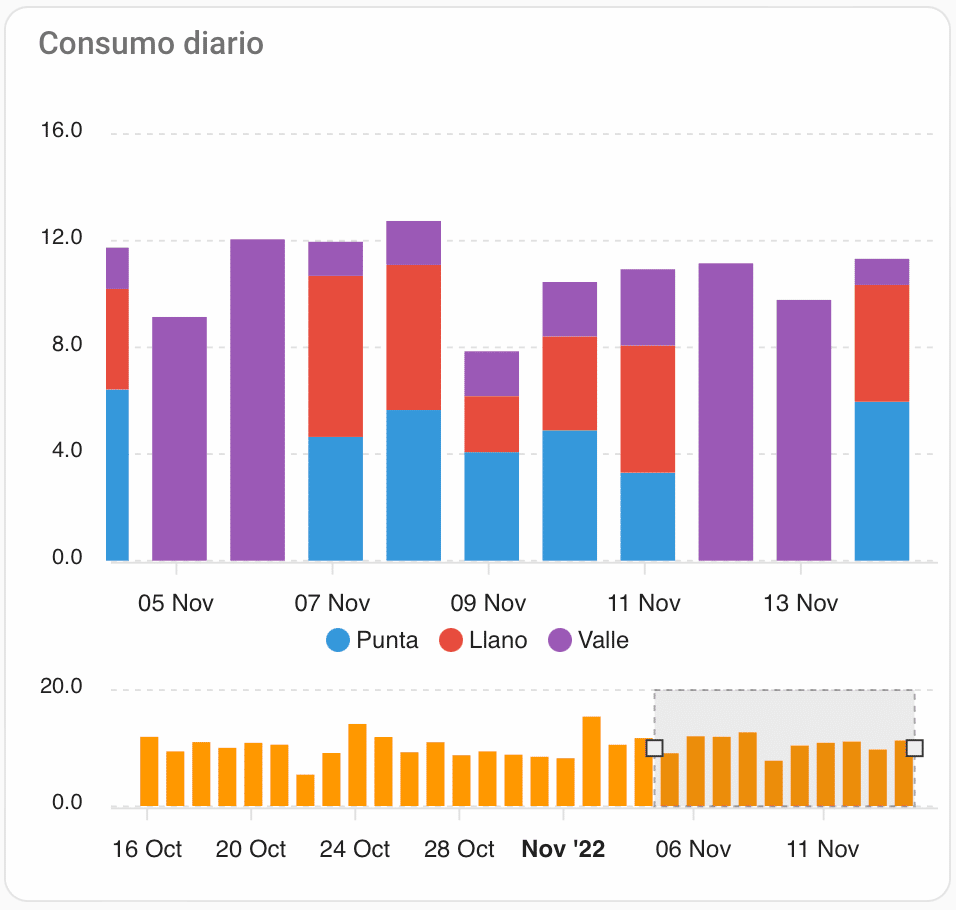
You also know by the previous episode of the podcast where I told you the devices and automations I have put there that I have an apartment in Valencia I go mainly in summer, although sometimes in winter I also use it as a base camp to go see the family in Valencia. Piece of story telling that I’m letting you go today, huh?
The problem: jump the differential when we have many things plugged in
Well, after spending all summer there, I’ve come back to Madrid with the kids still on vacation and getting pretty hot, so I have these days the computers of the children on, the 2 air-conditioning devices, I of teleworking, the typical washing machines of these days where it is very sweaty, that if swimwear, towels… and also cooking in induction, it works as a shot but it has a quite high consumption, so if we do not care a little bit about the thermal magnet by excessive consumption. And that’s what I have hired 5 kw, but we still get over it for a few minutes and it jumps.
There’s no need to tell you that Every time he jumps it’s a drama. That if my wife’s tanned because in this house nothing can be done as soon as a fire is lit, the light goes out, my children complaining that the Fornite has gone unconnected and my daughter said that she was just talking to a friend and she’s been cut off. And above, cuanta faster you have, more seems to take the router, HomeKit’s and Home Assistant’s accessory power plants to boot.
The solution: Notification from Home Assistant when consumption is excessive
To keep loving us all at home and not to jump the automatic so often, What I have done is to create a Home Assistant notification that tells me when consumption exceeds 4,8 kW and so I have a little bit of room for reaction.
This notification is actually very simple but not as easy as creating it from the same device. To create it you have to go to Settings / Devices and Services and here to Helpers or Helpers. If you do not know this section, it is very useful to create things that do not actually exist as groups of devices (I have some created for groups of lights, so you only turn on a device even if it is virtual and you don’t have to create an environment), virtual sensors or binary sensors (or threshold sensors that call them Home Assistant in Spanish), which is what we are going to create in this case. A threshold sensor or binary sensor is a virtual sensor that has only 2 posi
But you define when it is activated and when it is turned off.
In my case I have created a threshold sensor that is called excessive light _ and in the configuration I have since it is activated when the corresponding channel of the Shelly EM has a value greater than 4800 W.
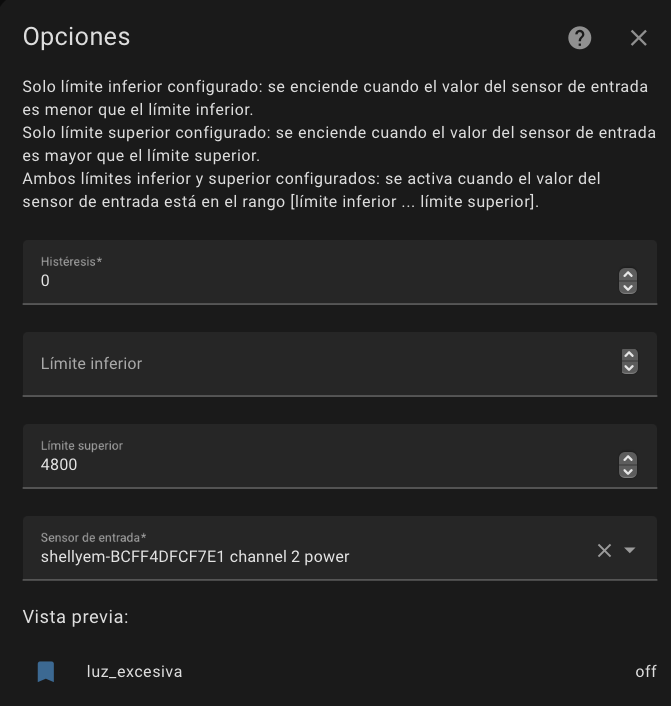
This way, When that happens, the virtual sensor is turned on… and when it comes down from that threshold, it’s turned off again.. That simple.
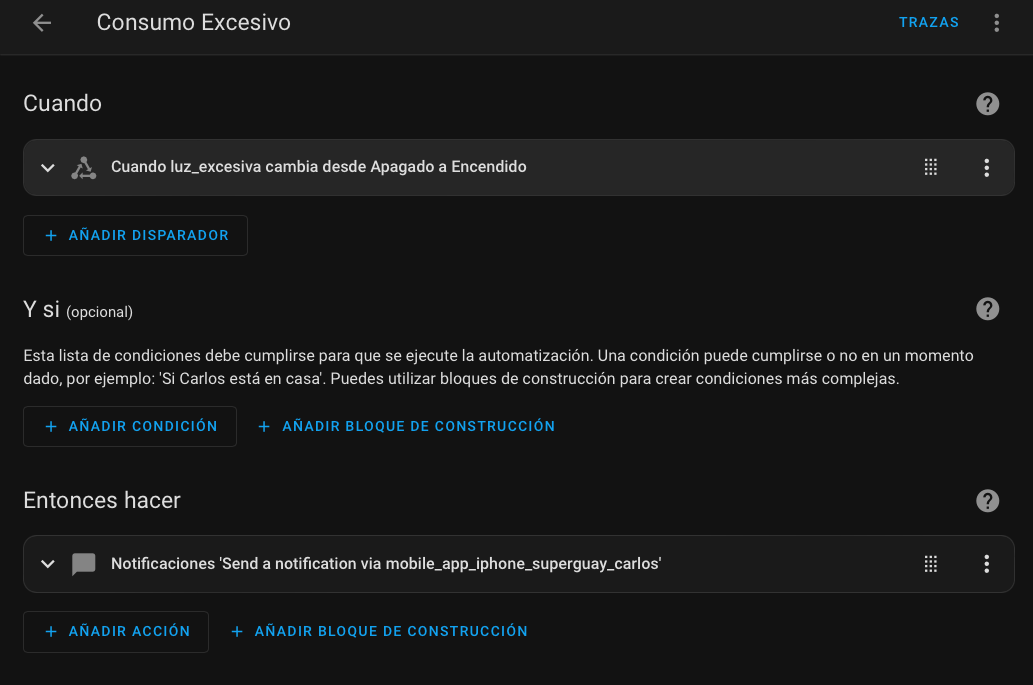
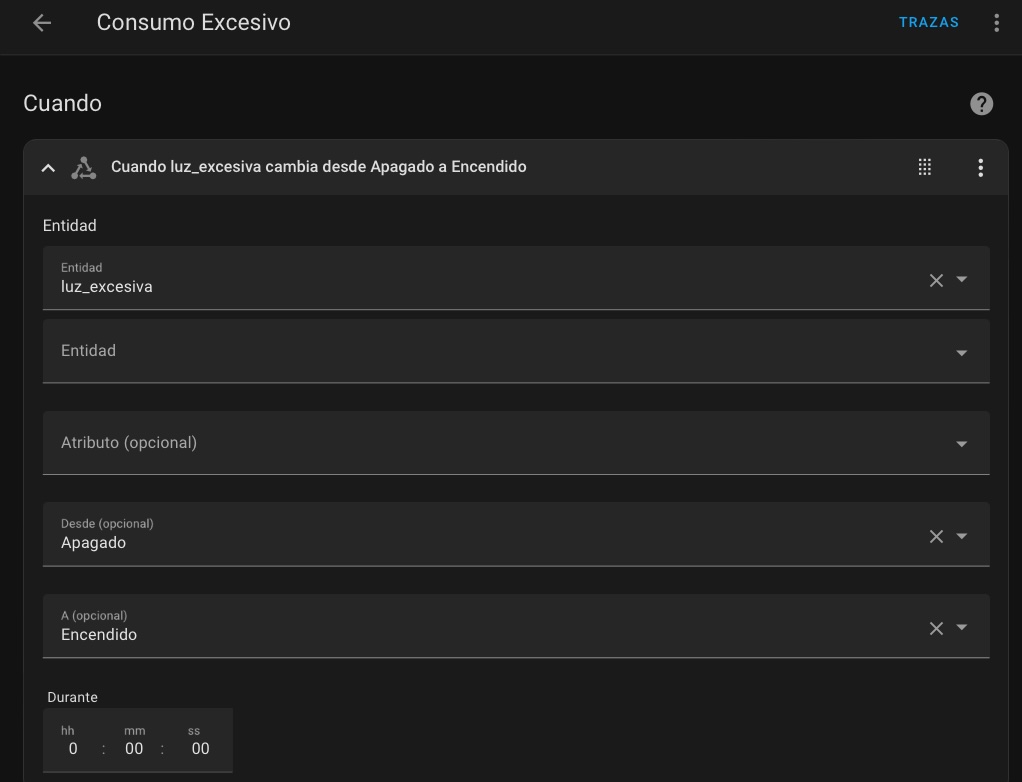
And now we have to create the notification, for that we are going to Adjustments / Automations and Scenes and we create a new automation where we tell you that When the created Entity ID that is light _ excessive changes from turned off to on, it sends me a notification to my device where it also tells me the exact consumption at that time:
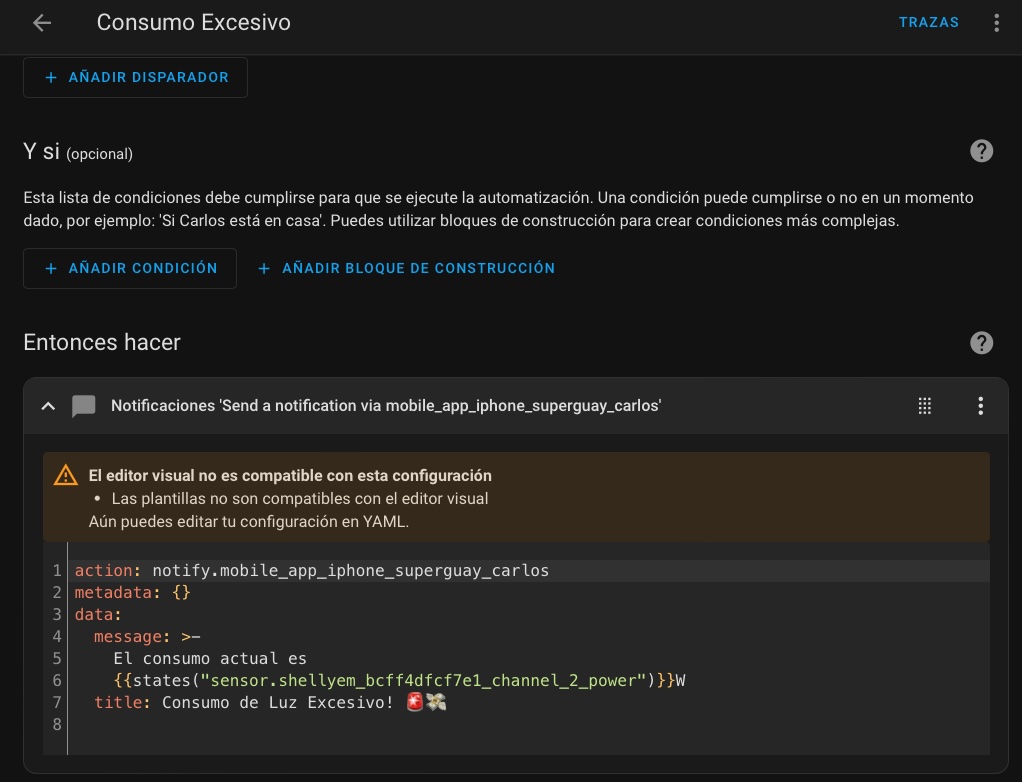
And in this simple way…

Actually, with the notification, we could do anything. We could make a clickable notification of those we have already talked about many times and, if for example we have an intelligent plug on one of the appliances we know they consume a lot, we can make it automatically turn it off or in the notification options let us turn it off. If we have a contactor installed in the electric box, we could even automate a whole circuit down, for example the whole kitchen… but that’s already big words.
I have a friend, pollogeek who’s in our Compatible Domotics Telegram Group but you can also find him in the MacIlustrated, which is a fan of consumer graphics almost on a sick level I would say, so has smart plugs and the MF shellys that measure energy consumption in almost all household appliances and switches. In this way, it can not only turn them off with excessive consumption, but also you may know for example when the washing machine ends and receive a notification on the mobile because the consumption of that ench
ufe has gone to 0. I tried to do that with the HomePod sound detector, I’ll tell you, now.
I’m sure some of you will be thinking. ‘Fuck how cool, I want that… but I don’t want to get involved in installing Home Assistant, I want all that to be done from HomeKit ‘. Well, yes. it can also be done, although it has some limitations. To begin with, we have to flashear the Shelly EM with the HAA firmware which we have already talked about sometimes, which makes it compatible with HomeKit and we can link it from the Home App. Peeeeero, although since the latest version of iOS 16 Apple people have implemented these data in app C
as well as the source of your supply to see if it is more or less ecological and so on (we can also do it at Home Assistant), this functionality is not yet active in Europe.
This doesn’t mean it’s no use flashing a Shelly EM, does it? If we flash it we’re gonna have those consumption data as well as Home Assistant, we’re just not gonna be able to see it in the House app… but yes in Controller for HomeKit For example, from where we can also create a smart and clickable notification and automate that notification so that when we exceed the consumption we directly turn off one of the intelligent sockets we have. It is true that it is a little more tender because it includes more intermediate steps… but I promise to explain it to you too.
step by step in a next episode and you’ll see how it’s very simple.
Not just good for this, huh? You can do a lot with a Shelly EM.. For example, if we have solar panels, We could load the electric car only when we have surplus.. By the way, If you are encouraged to buy it, in ShellySpain you can use the SAHUQUILLO code to have a 10% discount. Remember the interspersed H, huh? That I say it thirty times a day… then don’t come to me that it doesn’t work!
wp: block {«ref»: 1612} /
Carlos Sahuquillo
'Haga lo que haga en la vida, siempre compito' - Jacques Villeneuve Reserva una sesión →
Entradas relacionadas

HomeKit with AI in iOS 27
Apple released iOS 27 on September 14th and, as every year, I'm going through what's changing in the Home app and HomeKit.…

Webhooks and workflows in Controller for HomeKit
Kicking off Season 4. I'm picking back up the automation for the sensor that kept running out of batteries that I told…

How to tell if your kid is sneaking into your room without having a camera
I bought the Aqara P2 presence and light sensor with Matter, and I've got it running simultaneously on HomeKit and Home Assistant…
Muy interesante tu articulo,
Hice algo similar con un calentador electrico, el horno y el vitroceramico.
Encontré una table que muestra el «retraso de actuacion del ICP», o sea el differencial que esta dentro del contrador.
Esta table muestra durante cuanto tiempo puede superar la potencia contratada antes de que actue el contador, i.e. cortar el flujo de electricidad.
En mi caso solo puedo disconectar con un dispositivo Shelly el calentador electrico que consume 1,5KW cuando esta funcionando. También tengo otro dispositivo de Shelly que mide la potencia entrante en la casa.
Con algunas reglas simples en HA lo disconecto el celentador cuando el consumo supero la potencia contradado durante un cierto tiempo.
No puedo aportar la tabla (es un imagen) pero lo describe brevemente abajo:
Aumento Potencia Tiempo KW contrato KW disponible
+10% 60 min 4 4,4
+20% 50 min 4 4,8
‘+50% 15 min 4 6
+100% 5 min 4 8
+150% 1 min 4 10
+200% 10 seg 4 12
Como ves el contador permite «picos» cortos.
Wala Antoine, qué aporte tan interesante, muchísimas gracias!!! Efectivamente, con 2 Shellys puedes hacer esa automatización para apagar el calentador eléctrico, es muy buena idea.
Lo dicho, muchas gracias!!!